

What Is Software? Everyday Uses and Examples
Understanding software is useful for anyone interested in technology or planning a digital project. Software is the unseen system behind phones, computers, websites, mobile apps, banking, online shops, vehicles, hospitals, schools and businesses. Many everyday activities depend on it without us noticing. This article explains what software is, how it works, where it is used, its main types, its relationship to websites and mobile apps, and how custom software helps businesses.

Mehmet Karataş
Author
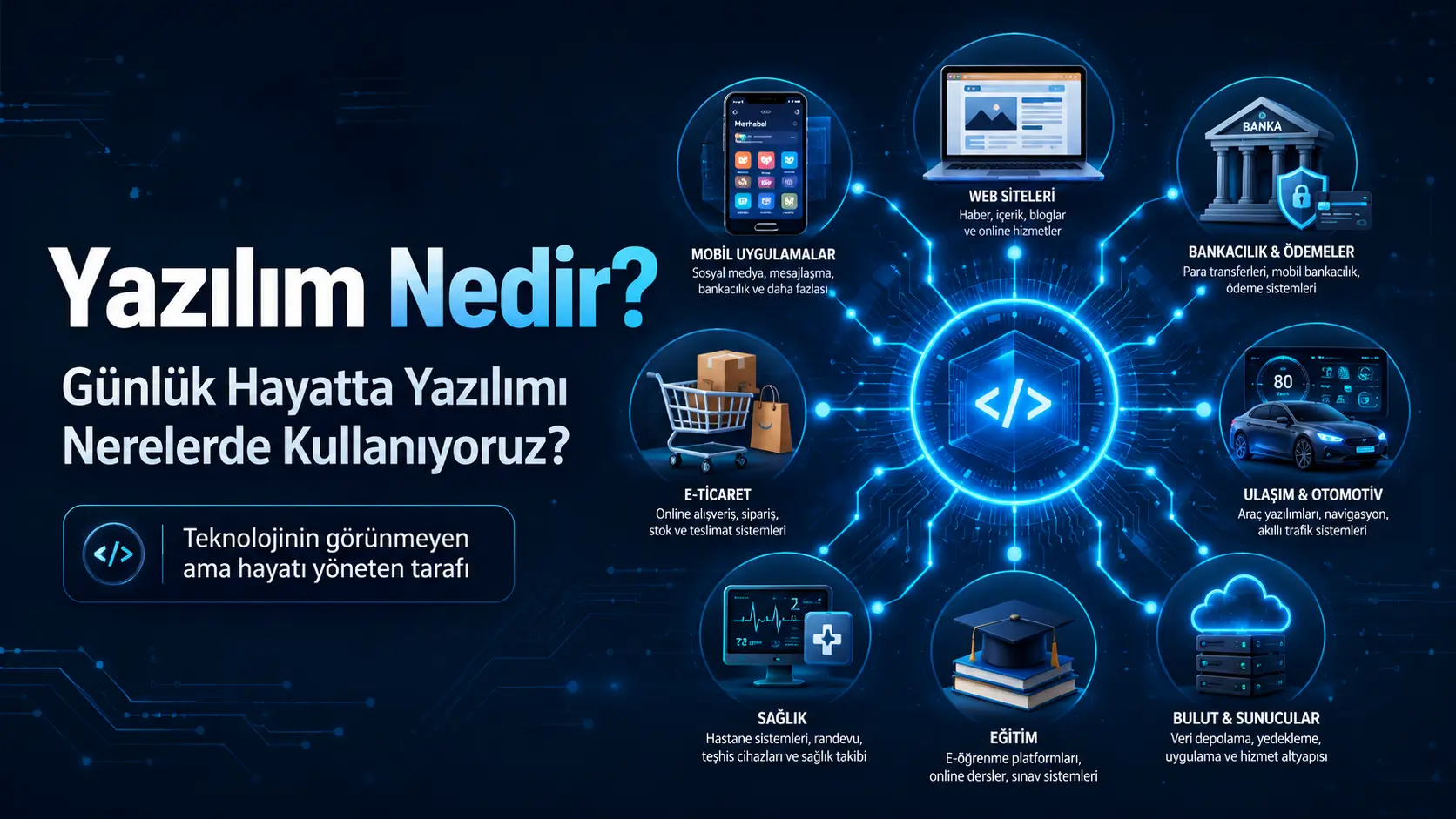
The Invisible System Behind Your Morning Alarm
Your alarm rings in the morning.
You pick up your phone, check the weather and messages, see a bank notification, open navigation and perhaps order a coffee.
All of these have something in common:
Software.
We often do not see software. It works quietly inside devices, behind websites, within mobile apps and in business management dashboards.
Being invisible does not make it unimportant.
Much of today’s digital world runs on software.
What Is Software?
Software is a set of instructions that enables computers, phones, tablets, servers and other smart devices to carry out tasks.
Put simply:
Software is the system that tells devices what to do.
Opening an app with a tap, saving a website form, transferring money through a banking app and placing an online order all depend on software.
Hardware is the physical part of a device.
For example:
A phone screen
A computer case
A keyboard
A camera
A processor
A server
Software is the unseen part that makes this hardware work.
In simple terms:
Hardware is like the body; software is like the mind telling it what to do.
Is Software Development Just Writing Code?
No.
People often picture code on a dark screen when they hear about software. Coding is important, but development is a broader process.
A software project usually includes:
Understanding the need
Understanding the users
Planning screens and workflows
Preparing designs
Designing the database
Writing code
Testing
Launching
Maintenance and further development
Writing the code is not the end of the process.
Good software should be planned, understandable, secure, performant and extensible.
Where Do We Use Software in Everyday Life?
Software is almost everywhere.
It appears in our pockets, cars, banks, school systems and shopping websites.
Let’s look at some examples.
1. Mobile Apps on Our Phones
Mobile apps are among the most visible everyday uses of software.
Almost every app on your phone is a software product.
For example:
WhatsApp
Instagram
YouTube
Banking apps
Food delivery apps
Maps and navigation apps
Shopping apps
Learning apps
Booking apps
Notes and calendar apps
Opening an app involves more than the design you see.
Accounts, notifications, messages, data, payments, locations and security checks may all work behind the scenes.
Mobile development is therefore one of software’s most visible applications.
2. Websites and Web Applications
Visiting a website also means using software.
There are two broad types to distinguish.
Simple Websites
A business website with service descriptions, an about page, a contact form and images primarily presents information.
Web Applications
Systems where people log in, carry out tasks, save data and use dashboards are web applications.
For example:
Online learning dashboards
Booking systems
CRM systems
Inventory tracking
E-commerce management dashboards
Student tracking systems
Admin panels
Customer portals
A website can serve as a shop window.
A web application can manage the business processes behind it.
3. Banking and Payments
Banking is one of software’s most critical applications.
Transfers, bill payments, card transactions, QR payments, account histories and identity checks all run through software.
A transfer, for example, involves checks such as:
Is the user’s identity valid?
Is there enough money in the account?
Are the recipient details correct?
Is the transaction secure?
Has the banking system approved it?
Should a notification be sent?
The user simply presses “Send”.
A substantial software workflow sits behind that button.
4. Online Shops
Many software components work together when you buy a product online.
For example:
Product listings
Adding items to a basket
User accounts
Saved addresses
Payment infrastructure
Stock checks
Delivery tracking
Order management
Returns
Admin panels
For the shopper, the process looks simple:
Choose a product, add it to the basket and pay.
For the business, software manages orders, stock, payment checks and customer details.
E-commerce software supports both sales and the operations around them.
5. Schools, Courses and Education
Software is widely used in education.
Examples include student tracking, online lessons, exam analysis and parent information systems.
Education software may include:
Student registration
Timetables
Homework tracking
Practice exam analysis
Attendance tracking
Teacher dashboards
Parent dashboards
Notifications
Online videos
Many of these tasks were once managed through notebooks, spreadsheets or messaging apps.
Custom software can make them more organised, measurable and sustainable.
6. Hospitals and Healthcare
Software has a critical role in healthcare.
Appointments, patient records, laboratory results, prescriptions and clinician dashboards rely on it.
For example:
Booking appointments
Viewing patient histories
Tracking test results
Recording clinical notes
Creating prescriptions
Viewing imaging results
Preparing medical reports
Security and privacy are particularly important in these systems.
Health information is sensitive. Data management, permissions and security therefore need careful planning.
7. Vehicles and Smart Devices
Modern vehicles use software too.
It manages navigation, parking sensors, fuel consumption displays, multimedia, driver assistance and alerts.
Many other smart devices also run on software.
For example:
Smartwatches
Smart televisions
Security cameras
Smart home systems
Robot vacuum cleaners
Air conditioning controls
Smart plugs
The software inside these devices is often invisible to users.
Yet it determines how the device behaves.
8. Custom Business Software
Businesses do not all work in the same way.
Some manage appointments, others track inventory, coordinate field teams or maintain customer relationships.
This is where custom software can help.
Custom software is developed around a business’s needs when standard products are not sufficient.
For example:
Inventory systems
Appointment management
Customer tracking
Staff task management
Quotation and invoice tracking
Educational coaching dashboards
Order management dashboards
Service tracking
Management dashboards
Its purpose is to make scattered processes more organised and manageable.
What Are the Main Types of Software?
Looking at the main categories helps explain the field.
Type | Purpose | Example |
|---|---|---|
System software | Runs a device’s basic functions | Windows, Android, iOS |
Application software | Lets users perform tasks | WhatsApp, Word, banking apps |
Web software | Runs through a browser | Online shops and dashboards |
Mobile software | Runs on phones and tablets | iOS and Android apps |
Embedded software | Runs inside devices | Smartwatches and vehicle systems |
Custom software | Addresses a specific need | Inventory, booking and student tracking systems |
Each category serves different purposes.
The underlying idea is the same:
Solve a need digitally.
What Is a Backend? The Hidden Side of Software
Backend is a common term in software discussions.
It is the part of an app or website that manages data behind the scenes.
Logins, messages, payments and profile updates in a mobile app usually involve backend processes.
A backend can manage:
User registration
Logins
Database connections
File uploads
Payments
Notifications
Permissions
Admin panel data
The user presses a button on the frontend.
The backend carries out the operation correctly and securely.
Why Does an Admin Panel Matter?
Software includes more than the screens shown to users.
Most projects also need management tools.
The admin panel is where the system is controlled.
Suppose you launch an app where users register, place orders or book appointments.
Who manages that information?
That is the role of an admin panel.
It can let you:
View users
Manage orders
Check appointments
Add content
Send notifications
Track payments
Review reports
Set permissions
Software without suitable management tools becomes harder to operate as it grows.
An admin panel is therefore an important part of many professional projects.
How Does Software Development Work?
The process varies by project.
A typical sequence is:
1. Requirements Analysis
Define what the software should solve.
Ask:
Who is it for?
What problem does it address?
What will users do?
What will administrators control?
Which features are essential for the first release?
2. Defining the Scope
Not every feature needs to be in the first version.
Start with essential needs and add features as the product develops.
3. Design
Prepare the user screens.
They should be attractive and let people complete tasks easily.
4. Development
Turn the plans and designs into working software.
Build the app, website, backend, database and admin panel at this stage.
5. Testing
Check for errors before launch.
Test different devices, screen sizes, user roles and data flows.
6. Launch
Publish the website or prepare the mobile app for App Store and Google Play submission.
7. Maintenance and Further Development
The work continues after launch.
Improve the system through new requirements, security updates, performance work and user feedback.
Why Do Businesses Need Software?
Manual tracking becomes harder as a business grows.
Tasks initially handled through WhatsApp, spreadsheets or notebooks can become confusing.
For example:
Customer information becomes scattered.
Orders get mixed up.
Appointments are forgotten.
Payments become hard to track.
Staff tasks are difficult to monitor.
Reporting becomes harder.
Data stays in separate places.
Software can bring these processes into one system.
Well-planned software can provide:
More organised work
Faster operations
Fewer errors
Easier tracking
Better customer experiences
More reliable reporting
More manageable processes
Scalable infrastructure
Software is more than an investment in technology.
Used well, it helps organise the business itself.
Does Software Always Have to Be a Large Project?
No.
Software does not have to mean a vast system.
A small, well-designed tool can sometimes remove a business’s biggest burden.
For example:
A simple appointment dashboard
A small inventory system
A customer registration screen
A staff task tracker
An online form system
A quotation dashboard
A mobile notification system
What matters is whether it solves a real need.
A simple, reliable system is more useful than a complex product nobody uses.
Where Should Beginners Start?
Start by deciding which area interests you.
Software is a broad field.
For example:
For websites, start with HTML, CSS and JavaScript.
For mobile apps, Flutter and Dart can be useful options.
For backends, learn databases, APIs and server concepts.
For data analysis, consider Python.
For games, explore game engines and their languages.
Whatever the field, the basic approach is the same:
Understand the problem, break the solution into parts and implement it step by step.
Learning software development is about building a way of thinking as well as learning code.
How Software, Mobile Apps and Websites Fit Together
Mobile apps, websites and custom software are not completely separate worlds.
They are different applications of software development.
A business might combine:
A website for promotion
A mobile app for users
An admin panel for management
A backend and database for information
SEO-friendly content for search visibility
Together, these parts can create a stronger digital system.
Sometimes a website alone is enough.
Sometimes a mobile app is enough.
Other projects need web, mobile and management tools planned together.
How Can I Help?
Many people begin with a simple thought:
“I want someone to build a system.”
The more useful question is:
What will it solve, and how will it be managed?
At Ben Mühendisiniz, I start website, mobile app and custom software projects by understanding the need.
Depending on the project, support can include:
Website design and development
Mobile app development
iOS and Android apps with Flutter
Backend development
Admin panels
Supabase or Firebase infrastructure
User dashboards
Custom software
SEO-friendly website foundations
Post-launch maintenance and development
The aim goes beyond software that merely runs.
It is to create an organised, secure, performant and manageable system that can develop over time.
Conclusion: Software Organises Everyday Life Behind the Scenes
The simplest answer to “What is software?” is:
Software tells digital devices and systems what to do.
It appears in phone apps, banking, websites, vehicles, hospital records and business dashboards.
Many everyday conveniences depend on software working quietly in the background.
For a business, startup or personal project, begin by understanding the need, defining the scope and planning a maintainable system before commissioning code.
Well-planned software makes today easier and creates digital foundations that can grow in the future.
Software FAQs
What is software in simple terms?
Software is a set of instructions that tells a computer, phone or digital system how to carry out specific tasks.
Where do we use software every day?
In phone apps, websites, banking, online shops, vehicles, hospitals, schools, smart homes and business dashboards.
Is a website software?
Yes. Websites with accounts, forms, admin panels, payments, orders or data management operate through software.
Is a mobile app software?
Yes. Android and iOS apps are software products. They may include interfaces, databases, backends and security systems.
What is a backend?
The backend manages data behind the scenes, handling logins, records, payments, messages and admin operations.
What does custom software do?
It addresses a business or project’s specific needs, such as tracking inventory, bookings, customers, students, payments or tasks.
What should I consider when commissioning software?
Clarify the need and scope, plan user experience and admin tools, prioritise security and performance, and discuss maintenance from the beginning.
Comments (0)
No comments yet. Be the first!
Leave a comment