Frontend and Backend: The Visible and Hidden Sides of Software
Imagine a customer commissioning a website or mobile app with this request:
“Users should register, browse products and pay, and I want to track everything in an admin panel.”
This may sound like a few screens, but a larger system works behind them.
The registration form is visible. The system checking details, storing passwords securely and creating accounts is hidden.
The product list is visible. The system fetching products, checking stock and managing prices is hidden.
The payment button is visible. Communication with the payment provider, verification and order recording happen behind the scenes.
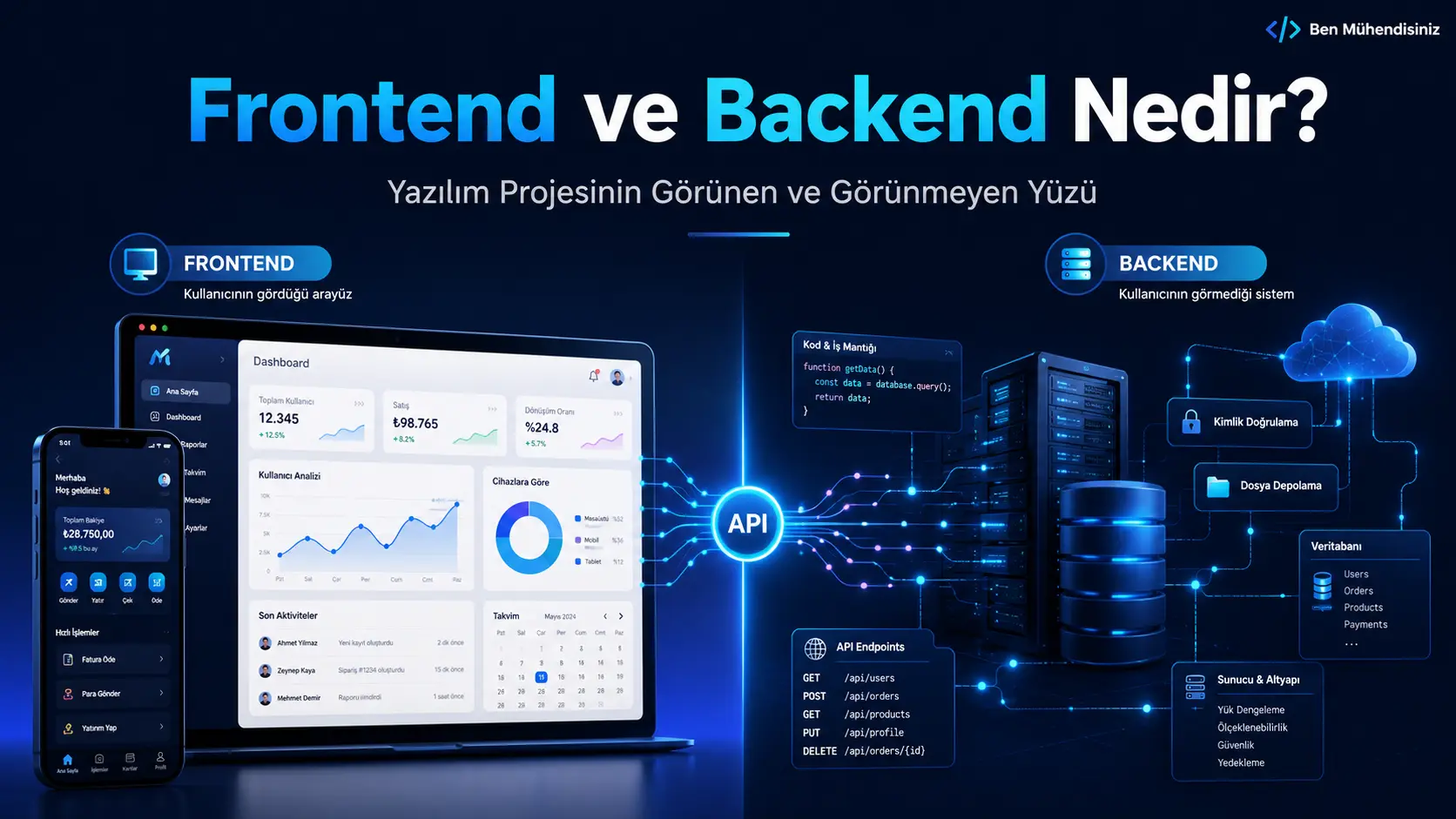
These two parts are generally called Frontend and Backend.
What Is the Frontend?
The frontend is the part of a website or app that users see and interact with directly.
Put simply:
It is the visible face of the software.
Headings, buttons, menus, forms, cards, images and animations belong to the frontend.
In a mobile app, the login screen, home page, profile, messaging interface and settings are frontend features too.
Frontend Examples
In an e-commerce app, these include:
Product listings
Product details
Add-to-basket buttons
Payment forms
User profiles
Order history
Search and filters
Notification screens
Users see, tap, click and interact with these elements.
The frontend usually retrieves information from the backend and presents it clearly, rather than creating the data itself.
What Does a Frontend Developer Do?
A frontend developer turns designs into a working website or application.
The work covers speed, clarity and usability across devices as well as appearance.
Typical tasks include:
Coding pages and screens
Supporting mobile, tablet and desktop layouts
Implementing buttons and forms
Building navigation
Adding animations
Fetching backend data
Displaying loading and error states
Improving user experience
Optimising performance
Improving accessibility
When someone presses “Log in”, the frontend takes the email and password from the form and sends them to the backend for verification.
If login succeeds, it navigates to the home page. If the details are incorrect, it shows a clear warning.
Which Technologies Are Used for Frontend Development?
The foundations of web frontends are:
HTML
Provides the page structure.
HTML defines headings, paragraphs, images, forms and buttons.
CSS
Controls appearance.
CSS defines colours, font sizes, spacing, cards, responsive layouts and animations.
JavaScript
Adds behaviour and interaction.
JavaScript can manage buttons, menus, form checks, dynamic content and backend connections.
Modern web projects may also use:
React
Next.js
Vue.js
Angular
TypeScript
Tailwind CSS
Mobile projects may use Flutter, React Native, Swift or Kotlin.
Choose technologies based on scope, target platforms, performance needs and future development plans.
What Is the Backend?
The backend is the part users do not see directly that makes the system work.
Put simply:
It manages data behind the scenes.
Logins, registration, payments, messages, orders, notifications and admin operations involve the backend.
When someone logs in, it may:
Check the submitted email address.
Verify the password.
Check whether the account is active.
Determine permissions.
Create session information after a successful login.
Return the result to the frontend.
Users do not see these steps, only whether login succeeds.
What Does a Backend Developer Do?
A backend developer builds the systems that process data, apply rules and connect services.
Typical tasks include:
When a customer places an order in a restaurant app, the backend may check:
Are the products still available?
Are the prices current?
Is the restaurant accepting orders?
Is the delivery address within its service area?
Did payment succeed?
Which restaurant should receive the order?
Should the customer and business be notified?
A single visible button can trigger many operations.
Which Technologies Are Used for Backend Development?
Backends can use various languages and platforms.
Common choices include:
Node.js
Python
Java
C#
PHP
Go
Ruby
Kotlin
Examples of backend frameworks:
Express.js
NestJS
Django
FastAPI
Laravel
Spring Boot
ASP.NET Core
Data storage systems and platforms include:
PostgreSQL
MySQL
MongoDB
Firebase
Supabase
Redis
The goal is a secure, maintainable infrastructure suited to the project, rather than choosing technology solely for its popularity.
How Do Frontend and Backend Differ?
They are two parts of the same project with different responsibilities.
Area | Frontend | Backend |
|---|
Visible to users? | Yes | Usually not |
Main responsibility | Presenting the interface | Managing data and operations |
Example | Login form | Checking login credentials |
Where it runs | Browser or mobile app | Server or cloud infrastructure |
Relationship to data | Displays data and collects input | Processes, stores and checks data |
Security responsibility | Basic input checks | Authoritative permissions and security checks |
Example technologies | React, Next.js, Flutter | Node.js, Python, Java, C# |
These parts do not replace each other.
They work together in most modern applications.
How Do They Work Together?
Imagine a user updating a profile in a mobile app.
The process usually looks like this:
1. The user completes a form
They change a name, phone number or profile picture.
The frontend displays the form.
2. The frontend collects the information
It prepares the submitted data.
It may warn about missing or incorrect fields.
3. The data goes to the backend
The frontend sends it through an API.
4. The backend verifies the user
It checks that the person making the request is authenticated.
5. The data is checked
It validates phone formats, file types and permissions.
6. The database is updated
If the information is valid, the user’s record is changed.
7. The backend returns a result
After success, the frontend displays “Your profile has been updated”.
A failure on either side affects the experience.
An attractive interface cannot save data if the backend fails. A strong backend cannot make a confusing interface easy to use.
What Is an API?
An API provides an interface for communication between frontend and backend.
Think of a restaurant:
The customer represents the frontend.
The kitchen represents the backend.
The waiter represents the API.
The customer gives the waiter an order. The waiter passes it to the kitchen and brings back the prepared meal.
Similarly, a frontend sends a request, the backend processes it and returns a result.
For example, the frontend might request:
“Retrieve this user’s five most recent orders.”
The backend queries the database and returns the relevant orders.
The frontend displays them as cards, a list or a table.
What Is a Database?
A database stores a software system’s information in an organised way.
A mobile app might store:
User accounts
Products
Orders
Messages
Appointments
Payments
Notifications
Comments
File links
System settings
A database is more than storage. Information needs to be accurate, related correctly and efficient to access.
An education app, for example, needs appropriate relationships between students, teachers, schedules, payments and appointments.
Poor database design may work initially but cause performance, security and management problems as users and data grow.
Is an Admin Panel Frontend or Backend?
It includes both.
The administrator sees:
Statistics cards
User lists
Product forms
Order tables
Charts
Settings pages
These are frontend elements.
Operations such as:
Deleting users
Changing permissions
Saving products
Updating order status
Generating reports
Filtering data
are handled by the backend.
An admin panel therefore requires more than a few screens. Define what it displays, what operations it supports and who has each permission.
Does Every Website Need a Backend?
No. Not every website needs a custom backend.
A simple site showing company information, services, projects and contact details can often be static.
A backend may be needed for:
A site listing services and a phone number can work without a custom backend.
A system where customers book appointments, staff manage them and notifications are sent needs backend capabilities.
Can a Mobile App Have Only a Frontend?
Some simple apps can.
Examples include calculators, offline notes and tools that run entirely on the device.
Accounts, cross-device synchronisation, messaging, payments, notifications and admin functions generally need a backend.
Services such as Firebase and Supabase can provide ready-made capabilities, including authentication, databases and storage, with integrations for other needs.
Using these services does not mean there is no backend. They supply part of that infrastructure.
What Determines Frontend and Backend Costs?
Cost depends on more than the number of screens.
A five-screen application can hide complex operations.
The main factors include:
Number of Screens
Home, login, registration, profile, payments, messaging and settings each require design and development.
Design Requirements
A simple interface using existing components differs from a fully bespoke animated design.
User Roles
Users may be customers, administrators, staff, teachers, students or businesses.
Each role needs appropriate views and permitted actions.
Backend Rules
Simple data storage differs from multi-stage approval, calculations and permission workflows.
Admin Panel
A basic list view involves less work than detailed reports, charts, filters and permissions.
Payment System
One-off payments, subscriptions, packages, commissions and refunds have different scopes.
Notifications
Email, SMS, push notifications and WhatsApp connections may each require separate integrations.
Maps and Location
Live location, address search, distance calculations and regional filters add scope.
Messaging
Direct and group messages, attachments, read receipts and real-time updates require different development work.
File Uploads
Uploads need planning for file sizes, security, storage and access, whether images, PDFs, videos or documents.
Launch and Maintenance
Store submissions, server setup, error tracking, backups and later updates may also form part of the project.
Clarify the scope before estimating cost.
Which Comes First: Frontend or Backend?
There is no single correct order.
Teams often work on both in parallel.
A typical process is:
Identify requirements.
List roles and features.
Plan screen flows.
Design the database.
Define API contracts.
Prepare designs.
Begin frontend and backend development.
Integrate both sides.
Run tests.
Launch the system.
Some projects begin with a design and frontend prototype so the customer can see screens early.
Others start with backend architecture because of complex business rules.
The order depends on the project, team workflow and technical risks.
Important Development Considerations
Look Beyond Appearance
Good design matters, but users must be able to complete tasks.
Protect the Backend
Do not enforce permissions only in the frontend.
Hiding a button does not prevent the underlying action. Authoritative permission checks belong on the backend.
Plan Mobile Layouts Early
Consider phones, tablets and desktops together during design.
Plan Loading and Error States
Connections may be slow, servers may fail and users may enter incorrect data.
Provide clear messages in these situations.
Design the Database for Growth
Even a system with a few initial users may need to grow.
Prioritise the First Release
Build the functions that matter most to users first.
Unnecessary features add cost, time and maintenance.
Plan for Maintenance
Launch is not the end.
Operating system and browser changes, security updates, performance improvements and new needs can all require maintenance.
Who Should Understand Frontend and Backend?
These concepts matter beyond developers.
Anyone commissioning these projects benefits from understanding the difference:
Understanding both sides helps you assess proposals.
It explains questions such as “Why does this screen take so long?” or “Why does a single button need backend work?”
A small visible feature can require changes to databases, security, notifications, payments and permissions.
A Practical Example: A Booking System
Imagine building a booking system for a consultancy.
On the frontend, the user:
Chooses a service.
Chooses a date.
Views available times.
Enters contact details.
Completes the booking.
On the backend, the system:
Checks working days.
Excludes closed dates.
Checks existing bookings.
Prevents double booking.
Applies daily booking limits.
Saves the appointment.
Notifies the business.
Sends confirmation to the user.
Creates a reminder if needed.
The visible action takes seconds, while the system applies many rules.
This illustrates the difference clearly.
What Should You Define Before Starting?
Decide how the system works as well as how it looks.
Useful questions include:
Who will use it?
How many roles are needed?
What will users do?
What information will be stored?
What should the admin panel include?
Will payments be needed?
Should a notification be sent?
Will users upload files or images?
Is a mobile app needed?
Will the website support mobile devices?
Will users message each other?
Will it connect to other services?
Which features belong in the first release?
How will maintenance work after launch?
Estimating time and cost from screenshots alone is unreliable without these answers.
What Should You Look for in Development Services?
Evaluate more than visual design.
Consider:
Custom software development involves more than writing code.
Plan requirements, design, data models, architecture, testing, deployment and maintenance together.
Planning Both Sides Together
A successful project treats frontend and backend as connected parts.
The frontend should provide a clear, fast and understandable experience.
The backend should manage the supporting data accurately, securely and consistently.
Identify needs correctly at the beginning of any app, website, dashboard or custom software project.
Considering planning, user experience, frontend, backend, databases, admin tools, security, SEO and maintenance together produces a more maintainable system.
Conclusion
What are frontend and backend? Here is the simplest answer:
The frontend is what users see and use. The backend manages data, applies rules and runs operations behind the scenes.
A button is visible on the frontend; the registration, payment, checks or notifications it triggers run on the backend.
Good software should be attractive, fast, secure, manageable and extensible.
Plan the data, permissions, security and management workflows alongside the visible screens.
Frequently Asked Questions
Can one person build both?
Yes. Developers who work on both are called full-stack developers. Larger projects may divide the work among specialists or teams.
Does a website need a backend?
A simple informational site may not need a custom backend. Accounts, payments, bookings, dashboards and dynamic data create backend requirements.
What does a mobile app’s backend do?
It manages accounts, data, notifications, payments, messages and business rules.
Is an admin panel frontend or backend?
Its visible screens are frontend components; its data management and operations are backend components.
What is an API?
An API enables the frontend and backend to exchange data and requests.
How long does development take?
It depends on screens, roles, business rules, admin tools, payments, notifications, messaging and integrations. Simple projects may take weeks, while comprehensive systems may take months.
Which is more important?
Both matter. The frontend supports user experience; the backend ensures data and operations work correctly.
Do Firebase or Supabase remove the need for a backend?
They provide ready-made backend features, but data structures, security rules, permissions and workflows still need planning and implementation.
Does software need maintenance after launch?
Yes. Security, performance, servers, operating systems and user needs change. Regular maintenance helps the system keep working reliably.



Comments (0)
No comments yet. Be the first!
Leave a comment