An Introduction to PostgreSQL: The Database Elephant 🐘
Time to Learn the Foundations of Data Management
Grab a coffee and let’s talk about PostgreSQL. It is a database that powers many modern web applications.
What Is PostgreSQL?
Every application needs somewhere to store its data: user details, blog posts, orders, comments and more.
PostgreSQL, or Postgres for short, is a powerful, reliable, open-source relational database management system that does exactly that.
What does relational mean?
It means data is stored in tables that can relate to one another. Think of spreadsheet tables, but with much more structure and capability.
Why PostgreSQL?
With alternatives such as MySQL, MongoDB and SQLite available, why choose Postgres?
1. Powerful and Stable
It has more than 30 years of development behind it. Software with that kind of history has stood the test of time.
2. Open Source and Free
There are no licence fees, and the community is strong. You can use and customise it to suit your needs.
3. ACID Compliant
Atomicity
Consistency
Isolation
Durability
These properties help keep database transactions complete, consistent, isolated and durable.
4. JSON Support
JSON is common in modern applications. Postgres can store both relational data and JSON, giving you the benefits of both.
5. Scalability
You can start with a small blog and grow into a platform with millions of users. Postgres can support that growth with appropriate architecture.
6. Used by Major Companies
Postgres is used in large technology organisations as well as smaller projects.
PostgreSQL vs MySQL vs MongoDB
A quick comparison:
PostgreSQL:
MySQL:
MongoDB:
A NoSQL database
Flexible document structure
Does not require a fixed table schema
Useful for rapid prototyping
Complex relationships require different modelling approaches
My recommendation: Learn PostgreSQL if you want to build a well-structured database. It combines relational foundations with modern features.
Core Concepts
Database
The main container for your data. A project often uses one database.
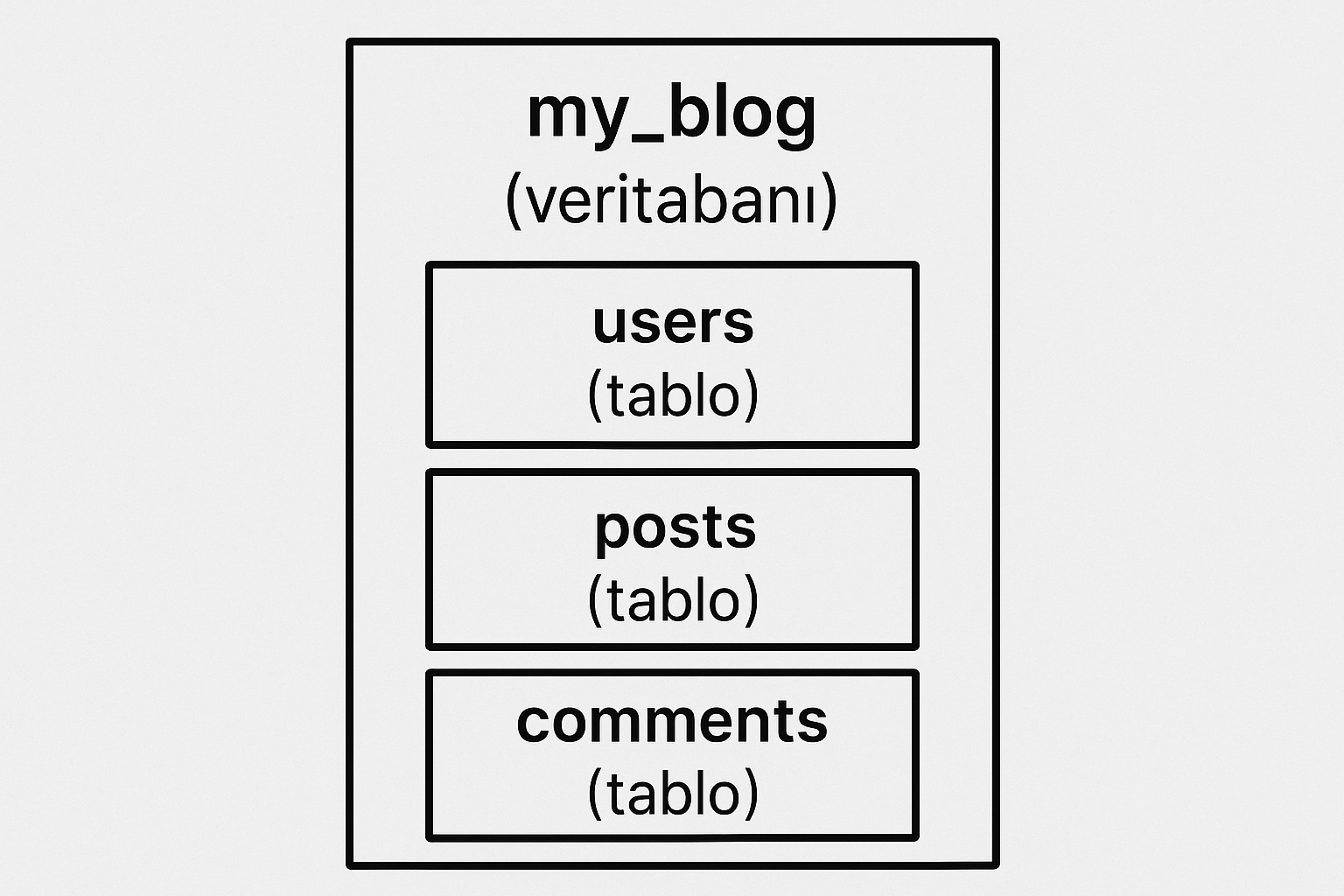
Table
A structure that stores data in rows and columns.
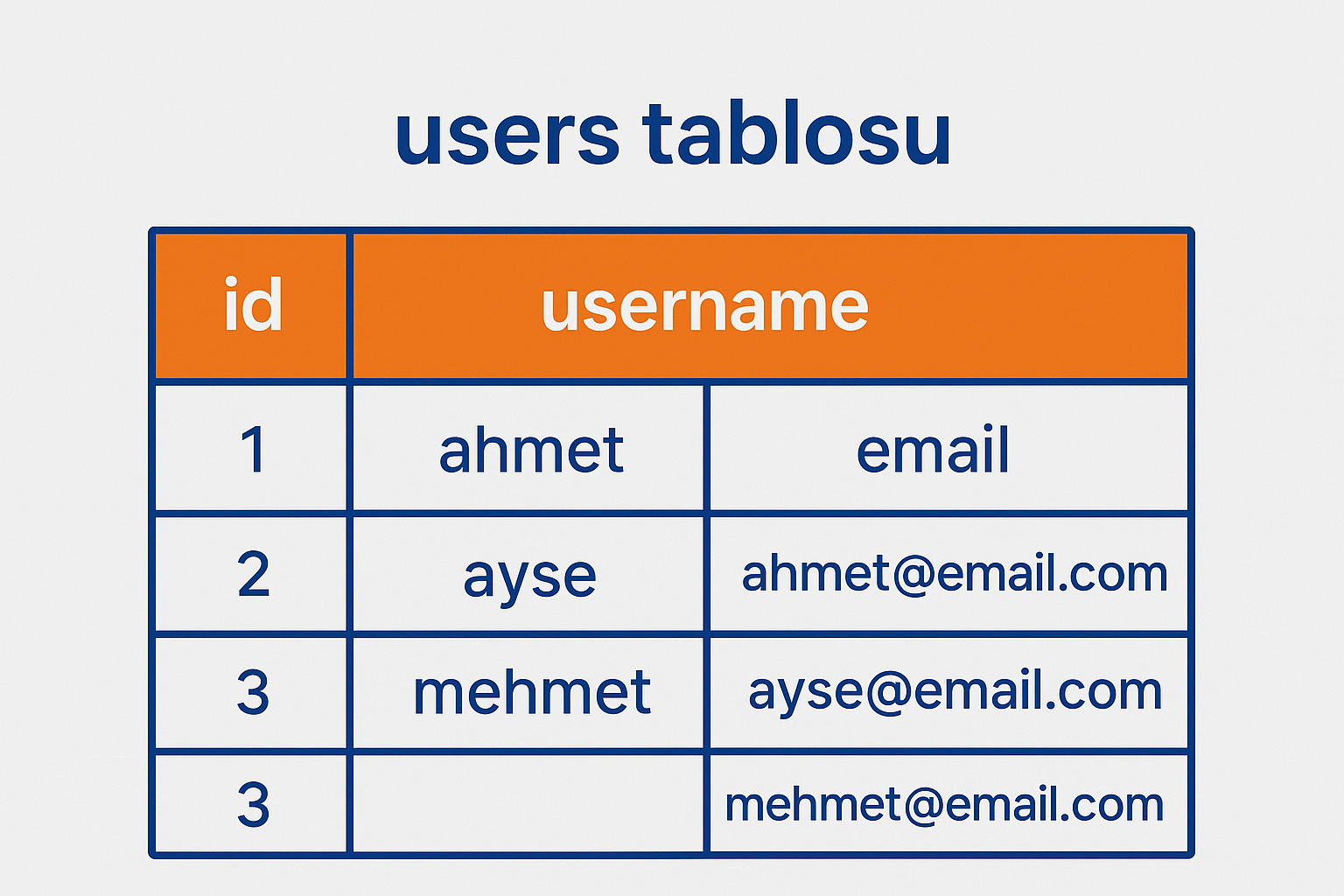
Column
An individual field in a table, such as id, username or email.
Row
An individual record. For example, one row can contain all of Ahmet’s user details.
Primary Key
A field that uniquely identifies each row, usually called id.
Foreign Key
A field that links one table to another.
Getting Started: Designing a Simple Blog Database
Suppose you are building a blog. What do you need?
1. The Users Table
CREATE TABLE users (
  id SERIAL PRIMARY KEY,
  username VARCHAR(50) UNIQUE NOT NULL,
  email VARCHAR(100) UNIQUE NOT NULL,
  password_hash VARCHAR(255) NOT NULL,
  created_at TIMESTAMP DEFAULT CURRENT_TIMESTAMP
);
Explanation:
SERIAL = an automatically increasing number (1, 2, 3…)
PRIMARY KEY = a unique identifier
VARCHAR(50) = a maximum of 50 characters
UNIQUE = duplicate values are not allowed
NOT NULL = a value must be provided
TIMESTAMP = a date and time
2. The Posts Table
CREATE TABLE posts (
  id SERIAL PRIMARY KEY,
  title VARCHAR(200) NOT NULL,
  slug VARCHAR(200) UNIQUE NOT NULL,
  content TEXT NOT NULL,
  author_id INTEGER REFERENCES users(id),
  published BOOLEAN DEFAULT false,
  created_at TIMESTAMP DEFAULT CURRENT_TIMESTAMP,
  updated_at TIMESTAMP DEFAULT CURRENT_TIMESTAMP
);
Explanation:
3. The Comments Table
CREATE TABLE comments (
  id SERIAL PRIMARY KEY,
  post_id INTEGER REFERENCES posts(id) ON DELETE CASCADE,
  user_id INTEGER REFERENCES users(id),
  content TEXT NOT NULL,
  created_at TIMESTAMP DEFAULT CURRENT_TIMESTAMP
);
Explanation:
Basic SQL Commands
Adding Data (INSERT)
-- Kullanıcı ekle
INSERT INTO users (username, email, password_hash)
VALUES ('mehmet', 'mehmet@email.com', 'hashed_password_123');

-- Blog yazısı ekle
INSERT INTO posts (title, slug, content, author_id, published)
VALUES (
  'PostgreSQL Öğreniyorum',
  'postgresql-ogreniyorum',
  'Bu benim ilk blog yazım!',
  1,
  true
);
Retrieving Data (SELECT)
-- Tüm kullanıcıları getir
SELECT * FROM users;

-- Sadece username ve email getir
SELECT username, email FROM users;

-- Yayınlanmış yazıları getir
SELECT * FROM posts WHERE published = true;

-- En yeni 10 yazıyı getir
SELECT * FROM posts ORDER BY created_at DESC LIMIT 10;
Updating Data (UPDATE)
-- Kullanıcının email'ini güncelle
UPDATE users
SET email = 'yeni@email.com'
WHERE id = 1;

-- Yazıyı yayınla
UPDATE posts
SET published = true, updated_at = CURRENT_TIMESTAMP
WHERE id = 1;
Deleting Data (DELETE)
-- Bir yorumu sil
DELETE FROM comments WHERE id = 1;

-- Yayınlanmamış yazıları sil
DELETE FROM posts WHERE published = false;
Relationships and JOINs
This is where tables become especially useful: combine them to retrieve meaningful information.
INNER JOIN
-- Yazıları yazarlarıyla birlikte getir
SELECT
  posts.title,
  posts.content,
  users.username as author
FROM posts
INNER JOIN users ON posts.author_id = users.id;
LEFT JOIN
-- Tüm kullanıcıları, yazı yazmamış olanları da getir
SELECT
  users.username,
  COUNT(posts.id) as post_count
FROM users
LEFT JOIN posts ON users.id = posts.author_id
GROUP BY users.username;
Complex Queries
-- Her yazının yorum sayısını getir
SELECT
  posts.title,
  users.username as author,
  COUNT(comments.id) as comment_count
FROM posts
INNER JOIN users ON posts.author_id = users.id
LEFT JOIN comments ON posts.id = comments.post_id
WHERE posts.published = true
GROUP BY posts.id, posts.title, users.username
ORDER BY comment_count DESC;
Database Design Principles
1. Normalisation
Organising data to avoid unnecessary duplication.
Poor Design ❌
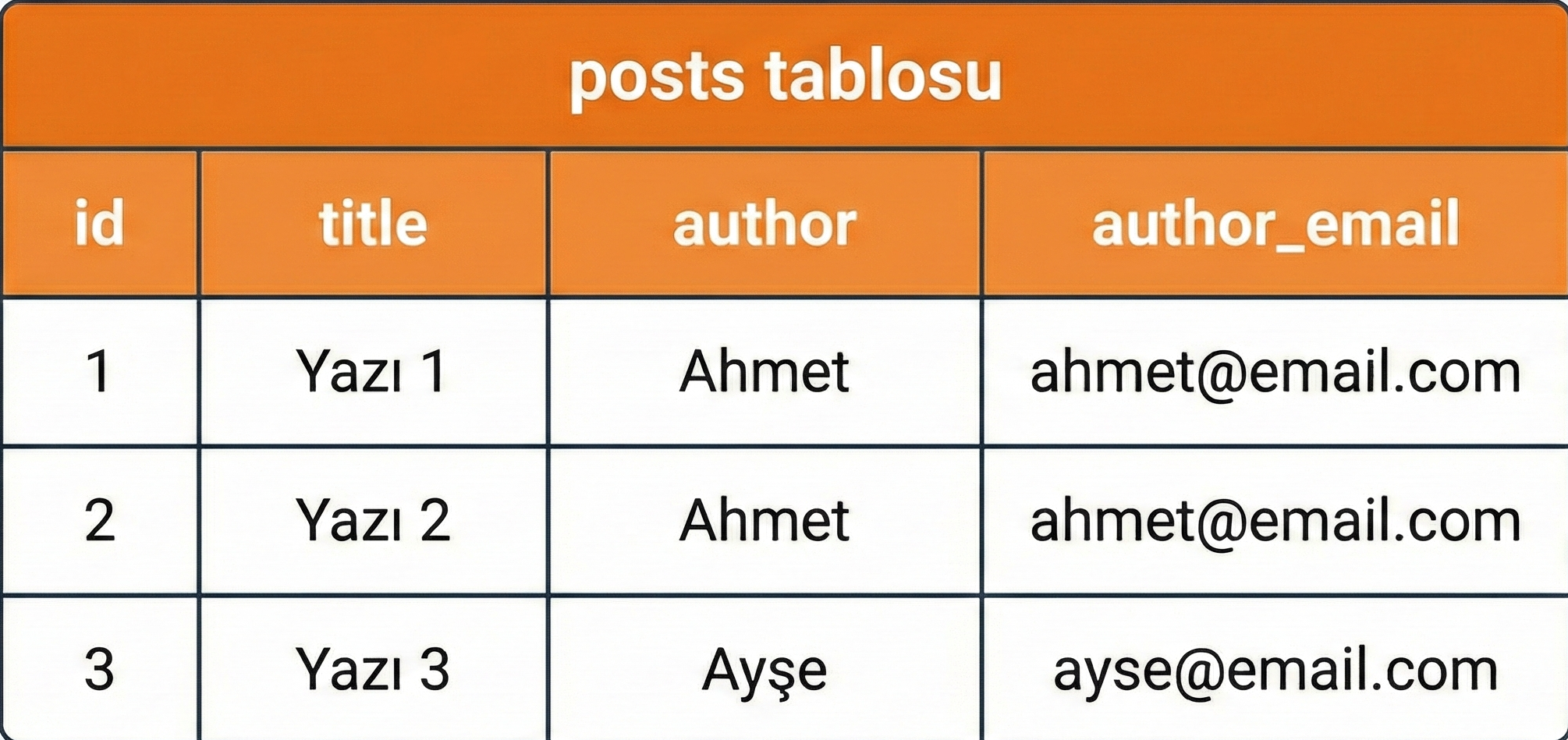
Problem: Ahmet’s email address is repeated in every row. If it changes, you have to update all of them.
Better Design ✅
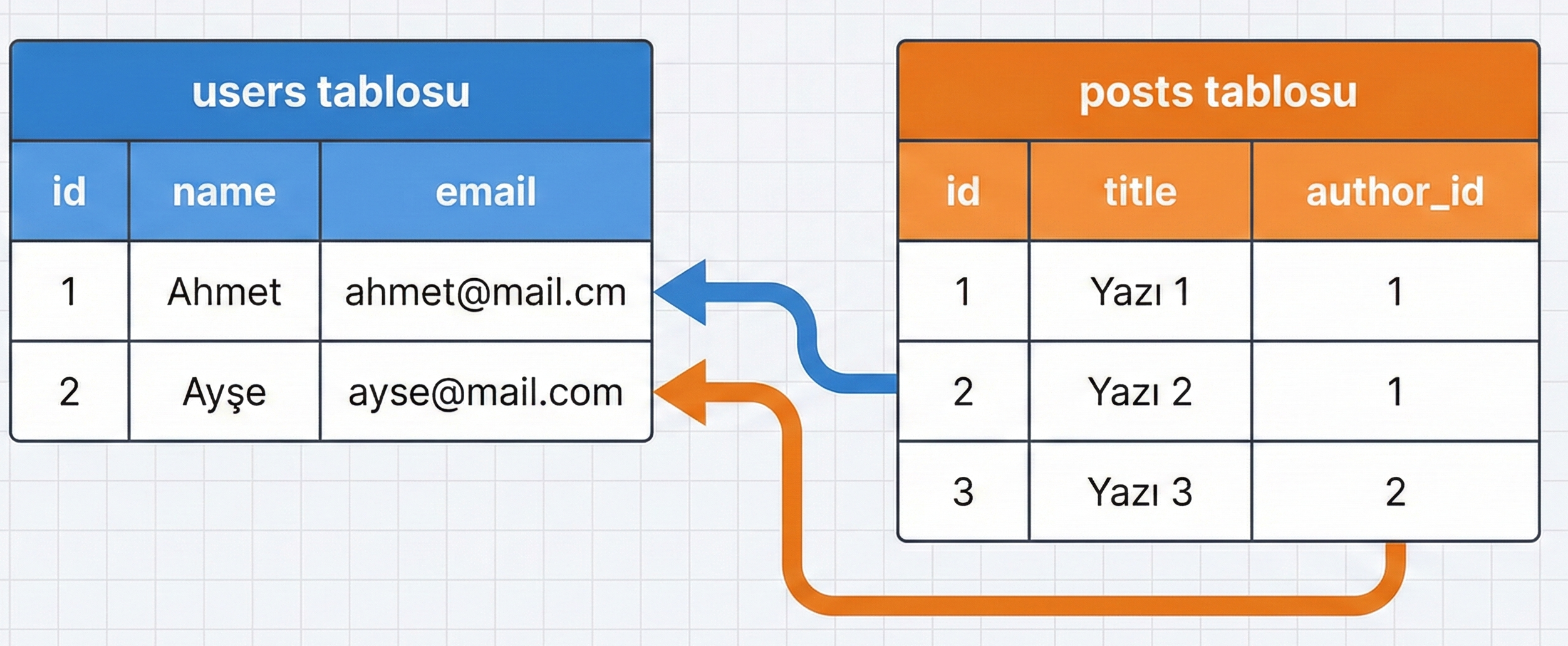
Solution: Store the email address once in the users table. Then you only need to update it in one place.
2. Indexing
Indexes help speed up queries.
-- Email'e göre sık arama yapıyorsan
CREATE INDEX idx_users_email ON users(email);

-- Slug'a göre sık arama yapıyorsan
CREATE INDEX idx_posts_slug ON posts(slug);
Without a useful index, the database may need to scan every row. An appropriate index can help it find matching records more directly.
3. Choosing Data Types
Use the right type for each value:
4. Constraints
Use constraints to protect data integrity:
CREATE TABLE products (
  id SERIAL PRIMARY KEY,
  name VARCHAR(100) NOT NULL,
  price DECIMAL(10, 2) CHECK (price > 0),
  stock INTEGER CHECK (stock >= 0),
  category_id INTEGER REFERENCES categories(id)
);
PostgreSQL with Supabase
If you use Supabase, you already use PostgreSQL. Supabase is a platform built on top of it.
Creating a Table in Supabase
From the dashboard:
Open the Table Editor
Click “New Table”
Add your columns
Save
From the SQL Editor:
-- Supabase SQL Editor'de çalıştır
CREATE TABLE todos (
  id UUID DEFAULT gen_random_uuid() PRIMARY KEY,
  user_id UUID REFERENCES auth.users(id),
  task TEXT NOT NULL,
  completed BOOLEAN DEFAULT false,
  created_at TIMESTAMP DEFAULT NOW()
);
Row Level Security (RLS)
An important Supabase capability: access rules enforced at the database level.
-- Kullanıcılar sadece kendi todo'larını görsün
CREATE POLICY "Users can view own todos"
ON todos FOR SELECT
USING (auth.uid() = user_id);

-- Kullanıcılar sadece kendi todo'larını ekleyebilsin
CREATE POLICY "Users can insert own todos"
ON todos FOR INSERT
WITH CHECK (auth.uid() = user_id);
Practical Examples
Example 1: A Blog
Requirements:
Users
Blog posts
Categories
Comments
Tags
Table structure:
-- Kullanıcılar
CREATE TABLE users (
  id SERIAL PRIMARY KEY,
  username VARCHAR(50) UNIQUE NOT NULL,
  email VARCHAR(100) UNIQUE NOT NULL,
  bio TEXT,
  avatar_url TEXT,
  created_at TIMESTAMP DEFAULT NOW()
);

-- Kategoriler
CREATE TABLE categories (
  id SERIAL PRIMARY KEY,
  name VARCHAR(50) UNIQUE NOT NULL,
  slug VARCHAR(50) UNIQUE NOT NULL
);

-- Yazılar
CREATE TABLE posts (
  id SERIAL PRIMARY KEY,
  title VARCHAR(200) NOT NULL,
  slug VARCHAR(200) UNIQUE NOT NULL,
  content TEXT NOT NULL,
  excerpt TEXT,
  cover_image TEXT,
  author_id INTEGER REFERENCES users(id),
  category_id INTEGER REFERENCES categories(id),
  published BOOLEAN DEFAULT false,
  view_count INTEGER DEFAULT 0,
  created_at TIMESTAMP DEFAULT NOW(),
  updated_at TIMESTAMP DEFAULT NOW()
);

-- Etiketler
CREATE TABLE tags (
  id SERIAL PRIMARY KEY,
  name VARCHAR(50) UNIQUE NOT NULL
);

-- Yazı-Etiket ilişkisi (Many-to-Many)
CREATE TABLE post_tags (
  post_id INTEGER REFERENCES posts(id) ON DELETE CASCADE,
  tag_id INTEGER REFERENCES tags(id) ON DELETE CASCADE,
  PRIMARY KEY (post_id, tag_id)
);

-- Yorumlar
CREATE TABLE comments (
  id SERIAL PRIMARY KEY,
  post_id INTEGER REFERENCES posts(id) ON DELETE CASCADE,
  user_id INTEGER REFERENCES users(id),
  parent_id INTEGER REFERENCES comments(id),
  content TEXT NOT NULL,
  created_at TIMESTAMP DEFAULT NOW()
);
Example 2: An Online Shop
Requirements:
Products
Categories
Orders
Shopping carts
Reviews
-- Ürünler
CREATE TABLE products (
  id SERIAL PRIMARY KEY,
  name VARCHAR(200) NOT NULL,
  slug VARCHAR(200) UNIQUE NOT NULL,
  description TEXT,
  price DECIMAL(10, 2) NOT NULL CHECK (price >= 0),
  stock INTEGER NOT NULL DEFAULT 0 CHECK (stock >= 0),
  category_id INTEGER REFERENCES categories(id),
  image_url TEXT,
  created_at TIMESTAMP DEFAULT NOW()
);

-- Siparişler
CREATE TABLE orders (
  id SERIAL PRIMARY KEY,
  user_id INTEGER REFERENCES users(id),
  total_amount DECIMAL(10, 2) NOT NULL,
  status VARCHAR(20) DEFAULT 'pending',
  shipping_address TEXT NOT NULL,
  created_at TIMESTAMP DEFAULT NOW()
);

-- Sipariş detayları
CREATE TABLE order_items (
  id SERIAL PRIMARY KEY,
  order_id INTEGER REFERENCES orders(id) ON DELETE CASCADE,
  product_id INTEGER REFERENCES products(id),
  quantity INTEGER NOT NULL CHECK (quantity > 0),
  price DECIMAL(10, 2) NOT NULL,
  subtotal DECIMAL(10, 2) NOT NULL
);

-- İncelemeler
CREATE TABLE reviews (
  id SERIAL PRIMARY KEY,
  product_id INTEGER REFERENCES products(id) ON DELETE CASCADE,
  user_id INTEGER REFERENCES users(id),
  rating INTEGER CHECK (rating >= 1 AND rating <= 5),
  comment TEXT,
  created_at TIMESTAMP DEFAULT NOW()
);
Performance Tips
1. Use EXPLAIN
See how a query runs:
EXPLAIN ANALYZE
SELECT * FROM posts WHERE author_id = 1;
2. Add Indexes
Index columns used frequently in queries:
CREATE INDEX idx_posts_author ON posts(author_id);
CREATE INDEX idx_posts_slug ON posts(slug);
CREATE INDEX idx_posts_published ON posts(published);
3. Use LIMIT
Avoid retrieving unnecessary data:
-- Kötü
SELECT * FROM posts;

-- İyi
SELECT * FROM posts LIMIT 20;
4. Avoid SELECT *
Retrieve only the columns you need:
-- Kötü
SELECT * FROM users;

-- İyi
SELECT id, username, email FROM users;
Common Mistakes and Solutions
1. The N+1 Problem
-- Kötü: Her yazı için ayrı sorgu
SELECT * FROM posts;
-- Sonra her post için:
SELECT * FROM users WHERE id = post.author_id;

-- İyi: Tek sorguda al
SELECT
  posts.*,
  users.username
FROM posts
JOIN users ON posts.author_id = users.id;
2. Forgetting Cascading Deletes
-- İlişkili verileri otomatik sil
FOREIGN KEY (post_id) REFERENCES posts(id) ON DELETE CASCADE
3. Missing Indexes
Consider indexes on columns used in WHERE, JOIN and ORDER BY clauses.
4. Incorrect Data Types
-- Yanlış
age VARCHAR(10)  -- Yaş string mi?

-- Doğru
age INTEGER
Conclusion: Why PostgreSQL Matters
Modern applications need reliable data storage. PostgreSQL has become an established choice for this job.
Why learn it?
A core skill: Database knowledge is essential for full-stack development
Powerful: Suitable for projects ranging from small apps to large platforms
Popular: A skill sought in many developer roles
Free: Open-source software without licence fees
Modern: Combines the capabilities of SQL and JSON
Where should you start?
Practise using Supabase’s free plan
Build a simple to-do app
Create a blog project
Design an online shop
Think about the data model in every project
Learning PostgreSQL takes time, but it is worthwhile. Once you understand it, many other database concepts become easier to grasp.
Get started, practise, make mistakes and learn. Take control of your data.
Let’s write some code!




Comments (0)
No comments yet. Be the first!
Leave a comment