

Mobile App Development Process and Cost: A Complete Guide
How long does mobile app development take, how is the cost estimated, and how do design and backend development work? A guide from idea to launch.

Mehmet Karataş
Author
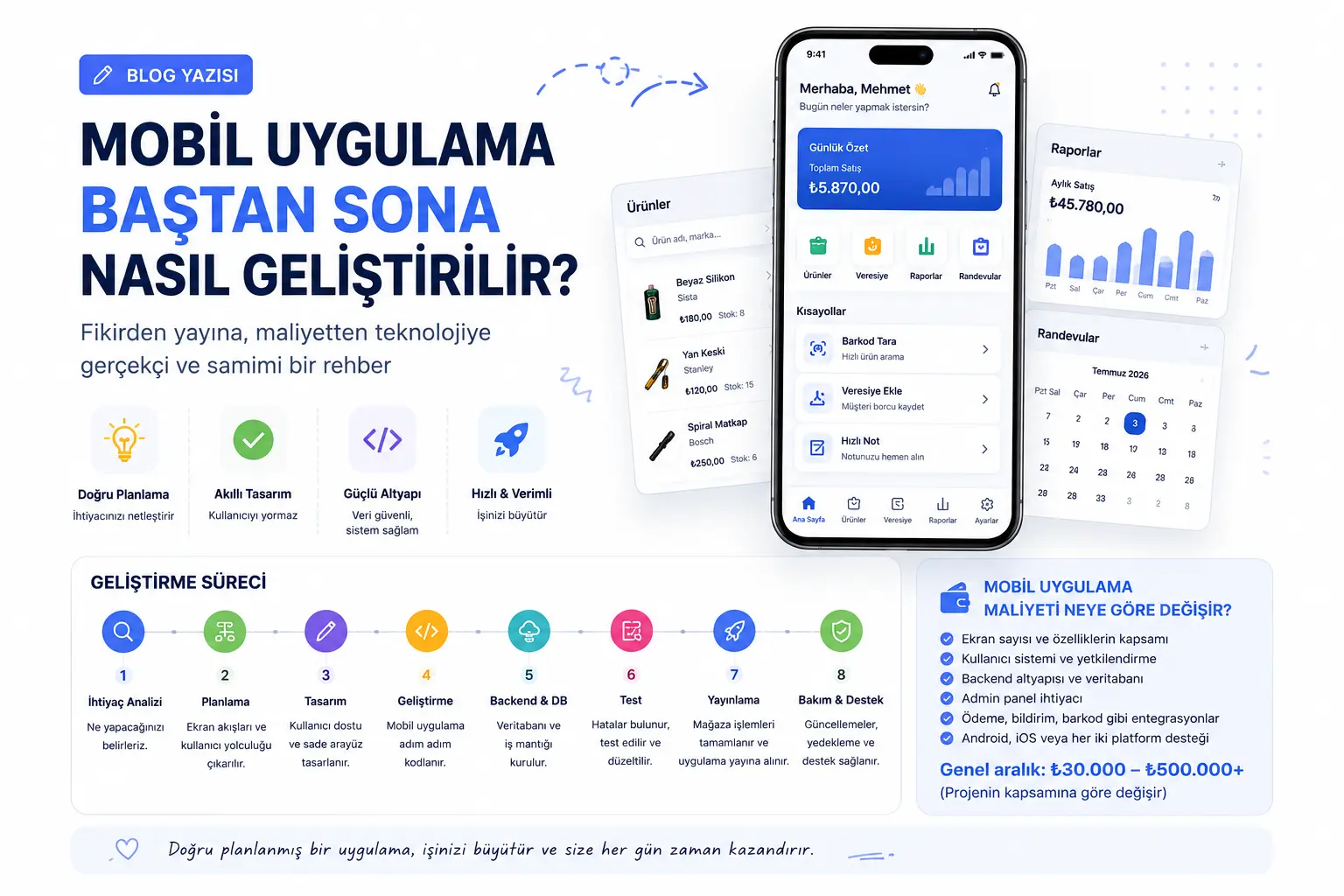
How Long Does It Take to Build a Mobile App, and What Does It Cost? A Practical Guide
An app idea rarely starts in a big meeting. It might begin with a handwritten credit note tucked into a notebook, a product that unexpectedly runs out of stock, or customers constantly requesting appointments through WhatsApp. Sometimes it starts with a business owner closing the shop and thinking:
“I wish all of this could be managed in one place.”
That is often where an app idea begins: a recurring task, unmet need or disorganised workflow becomes too burdensome.
Consider a hardware shop with products, inventory, barcodes, customer credit, customer records and daily sales. A notebook works at first. As products, customers and credit records grow, tracking purchases, payments, stock levels and monthly sales becomes difficult.
At that point, an app becomes a practical tool for organising the business, saving time and reducing mistakes.
However, development involves more than designing a few screens and adding buttons. A useful app is a digital product requiring planning, design, backend services, a database, testing, publication and maintenance.
This article explains the process from start to finish, why costs vary, what the backend needs, how AI affects development and how to think about the overall budget.
Where Should an App Idea Begin?
People often start with:
“I have an idea for a mobile app.”
That is a good beginning, but a real product requires more. The first step is answering this question:
What problem will the app solve?
This simple question determines the direction of the whole project.
An app might track inventory, manage salon appointments, monitor students' progress, support ecommerce sales, coordinate field teams or provide AI-powered suggestions.
Without a clear purpose, screens remain unclear, data structures become confused and costs rise. The project becomes more difficult than expected.
A good app starts with the right questions before any code is written.
Requirements Analysis: Laying the Foundation
Requirements analysis is the first major development stage.
Before designing or coding, establish what the app should do, who will use it and which features are actually needed.
Clarify these questions:
Who will use the app?
Will it serve one user or multiple users?
Will users log in?
Is an admin panel required?
Is Android enough, or will iOS also be supported?
Will data be stored on the phone or in the cloud?
Should the app work offline?
Should a notification be sent?
Will payments be needed?
Will it use barcodes, the camera, location or maps?
Will it be published on Google Play or the App Store?
These answers determine both time and cost.
A simple product catalogue differs greatly from a system with inventory, barcodes, sales, customer credit, reports, sign-in and admin tools. Both are mobile apps, but the work involved is very different.
Define the scope before seeking a firm price. Without it, a quote is likely to omit requirements or change during development.
User Journeys: What Will People Do First?
A good app clearly shows people what they can do, as well as looking attractive.
Users should feel:
“I immediately understand how to use this.”
In an inventory and customer credit app, users should see products, find them by barcode and record sales. A sale should update stock; a credit sale should update the customer's account. Reports should show outstanding balances, low stock and best-selling products.
The journey looks simple but depends on interconnected product management, stock movements, customer records, payment history, reporting and security.
Poor planning commonly causes:
Too many screens for a single task.
Repeated entry of the same information.
Changes that fail to appear elsewhere.
Incorrect reports.
Growing complexity as the app expands.
Difficulty adding features later.
Design the user journey first: where people start, which steps they follow, what each screen shows and what the system does after each action.
Design: Ease of Use Matters as Much as Appearance
Design is more than selecting colours, adding icons and creating attractive screens.
Its real purpose is to make users' tasks easier.
Business users usually want speed: adding products quickly, recording sales without delay, understanding reports without navigating complex tables and booking appointments in a few taps.
Text should be readable, buttons clear, screens uncluttered and frequently used actions easy to reach. Colours should support comfortable use.
For business apps especially, speed and simplicity matter more than decoration.
If recording a sale takes five screens, the design needs improvement. A well-designed app offers a short path to completing the task.
UI/UX is therefore central to the product. Even a powerful system loses value if people struggle to use it.
Development: How Does Coding Proceed?
Coding begins once planning and design are clear.
Flutter is a common option because one codebase can support both Android and iOS. This can reduce development time and cost, particularly for medium-sized projects.
Developers implement screens, buttons, forms, data connections, user interactions and system behaviour.
Simple apps take less work. Sign-in, inventory, barcode scanning, credit records, appointments, reports, notifications and admin integration naturally add time.
A feature involves more than what appears on screen.
Barcode scanning, for example, requires more than opening the camera. The app must find the correct product, allow an unknown product to be added, connect it to a sale, update stock and reports, and possibly record customer credit.
A small-looking feature can affect many parts of the system.
Backend and Database: The Essential Work Behind the Screens
The visible interface is the frontend. Much of the app's functionality lives in the backend.
The backend handles data, users, security rules, notifications and central business logic.
Online accounts, cloud storage, shared data and admin tools usually require backend services. Reporting, permissions, notifications, uploads, payments and synchronisation make this layer particularly important.
The database sits at the heart of that system.
A credit ledger needs more than “Mehmet owes TRY 500.” It must record when the balance arose, the associated sale, payments, due dates, transaction history and how everything appears in reports.
Inventory records may need a barcode, category, brand, quantity, purchase price, sale price, low-stock threshold, sales history and update date as well as a product name.
A weak backend may appear to work initially but struggle as users, data and features grow.
Plan this foundation carefully from the start.
Is an Admin Panel Necessary?
Not every app needs one, but admin tools are valuable in many business applications.
They let owners and managers add products, manage users and orders, review reports, send notifications, edit content and change settings.
Some tasks are easier on a computer than a small phone screen. Admin tools are particularly useful for large catalogues, multiple users and regular reporting.
Remember:
An admin panel is a separate development effort, effectively another application alongside the mobile app. Its time and cost should be included.
How Does AI Affect Development?
AI can accelerate coding, help find bugs, suggest user journeys, assist with content and automate repetitive tasks.
However, AI alone does not produce a high-quality app.
This distinction matters.
Used well, AI speeds up work. It does not fix poor planning. A flawed database, confusing journeys, missing security or unclear scope can simply lead to mistakes being produced faster.
AI is an assistant. Architecture, business logic, security, user experience and maintenance still require sound engineering.
It may lower some costs and shorten delivery, but it does not replace experience, careful analysis and maintainable code.
Testing: It Looks Finished, but Is It Ready?
Test the app before publishing it.
Testing is sometimes overlooked, yet an app that works for its developer may fail on other phones, screen sizes, poor connections or real-world usage patterns.
Check screens, buttons, saved data, offline behaviour, simultaneous users, report calculations and platform-specific differences on Android and iOS.
Payments, inventory, credit records, appointments and account management deserve particular attention because even a small error can affect real business data.
A good app is developed, tested, corrected and strengthened.
Publication: How Does an App Reach the Stores?
Publication follows implementation and testing.
Android apps commonly use Google Play, while iOS apps use the App Store. Prepare the name, description, icon, screenshots, privacy policy, category and submission forms.
Each store has its own requirements, especially around personal data, permissions, payments, children's content and privacy.
Review may take a few days or longer, depending on the store and submission. App Store reviews can require detailed follow-up.
Include this stage in the schedule.
How Much Does Development Cost?
The most common question is how much an app will cost.
There is no single accurate figure: the scope determines the price.
A simple app and an advanced system require very different budgets.
A few screens with limited data entry and no sign-in may be relatively inexpensive. Accounts, admin tools, notifications, payments, barcodes, reports, live data, cloud storage, AI and iOS support expand the scope.
The original article gives the following rough budget ranges for custom development:
A basic app: approximately TRY 30,000–75,000.
A medium-complexity business app: approximately TRY 75,000–200,000.
A larger app with admin tools, backend services and multiple modules: approximately TRY 200,000–500,000.
Large platforms with many users, payments, advanced reporting, AI, multiple roles and custom integrations may exceed TRY 500,000.
These are indicative figures, not quotations. Requirements differ: one app might only manage products and stock, while another includes payments, shipping, maps, AI and admin tools.
The key principle is:
More functionality requires more analysis, design, coding, testing and maintenance.
The Main Cost Drivers
Several factors determine the budget.
First, screen count. Each home, sign-in, profile, product, detail, report, settings, notification, payment or appointment screen requires design and implementation.
Second, accounts. Registration, sign-in, password resets and user roles directly affect the backend.
Third, data modelling. Products, customers, orders, credit records, appointments, reports and users need well-designed relationships.
Fourth, admin tools. They make management easier but require their own development work.
Fifth, integrations. Payments, SMS, email, maps, barcodes, cameras, AI, shipping and accounting systems expand the project.
Sixth, platforms. Android-only development differs from supporting both Android and iOS. Flutter can help, but iOS testing and publication still require attention.
Seventh, maintenance. After launch, teams fix bugs, add features, meet changing store requirements and monitor servers and databases.
Budget for ongoing maintenance as well as the initial build.
How Long Will It Take?
As with cost, timing depends on scope.
A basic app might take 2–4 weeks.
A medium-complexity business app might take 1–3 months.
A multi-module system with backend services and admin tools might take 3–6 months.
Larger platforms may take more than 6 months.
These estimates include analysis, screen planning, design, implementation, testing, revisions and publication—not just coding.
Clients sometimes think only of implementing screens when asking about completion. The real work includes correct operation, security, reliable data and a usable experience.
A rushed, poorly tested app may seem finished but create more problems later.
What Makes a Good App?
Simply running is not enough.
A good app opens quickly, is easy to use, keeps data secure, fits its screens, avoids unnecessary features and supports future growth.
Success often comes from providing the right features in the right places.
A simple app can be more valuable than a complicated one. Users care about how much easier their work becomes.
A business owner may simply want to:
Find products quickly.
Record sales easily.
Update stock automatically.
Keep credit records accurate.
View monthly reports.
Avoid unnecessary effort.
A good app delivers that experience.
Expense or Investment?
An inadequately planned app can become an expense with little benefit.
A usable app designed around real needs can be a worthwhile business investment.
It affects everyday operations: digitising records, reducing forgotten tasks, simplifying inventory, organising customers, making reports accessible and giving teams greater control.
For small and medium-sized businesses, it can help establish order before further expansion.
The important point is:
Do not overload the first release with unnecessary features.
Solve the main need, collect feedback and then expand. This helps control costs and encourages actual use.
Conclusion: Start with the Right Plan
App development looks technical, but it begins with clear thinking.
Analyse requirements, map user journeys, simplify screens, establish a reliable backend, model data carefully, test thoroughly and plan maintenance.
AI can assist with coding, ideas, debugging and content, but quality still depends on sound engineering.
If you have an app idea, start here:
Simplify the idea.
Clarify the problem it solves.
Plan the screens, users, data and budget step by step.
A well-built app becomes a digital assistant that helps organise your work every day.
Sometimes a business needs exactly that:
Less confusion.
Fewer forgotten tasks.
Better-organised data.
Faster operations.
Clearer reports.
Greater control.
A carefully planned app can bring these benefits together in one place.
Comments (0)
No comments yet. Be the first!
Leave a comment