

Mobile App Development Guide: From Idea to Launch
Building a mobile app involves much more than turning an idea into code. Idea validation, audience research, user experience, technology choices, backend development, an admin panel, testing and publication on the App Store and Google Play should be planned together. This guide explains the process from idea to launch, including the factors affecting cost and delivery time, the advantages of building for iOS and Android with Flutter, and ongoing maintenance. It helps people with an app idea make better-informed decisions.

Mehmet Karataş
Author
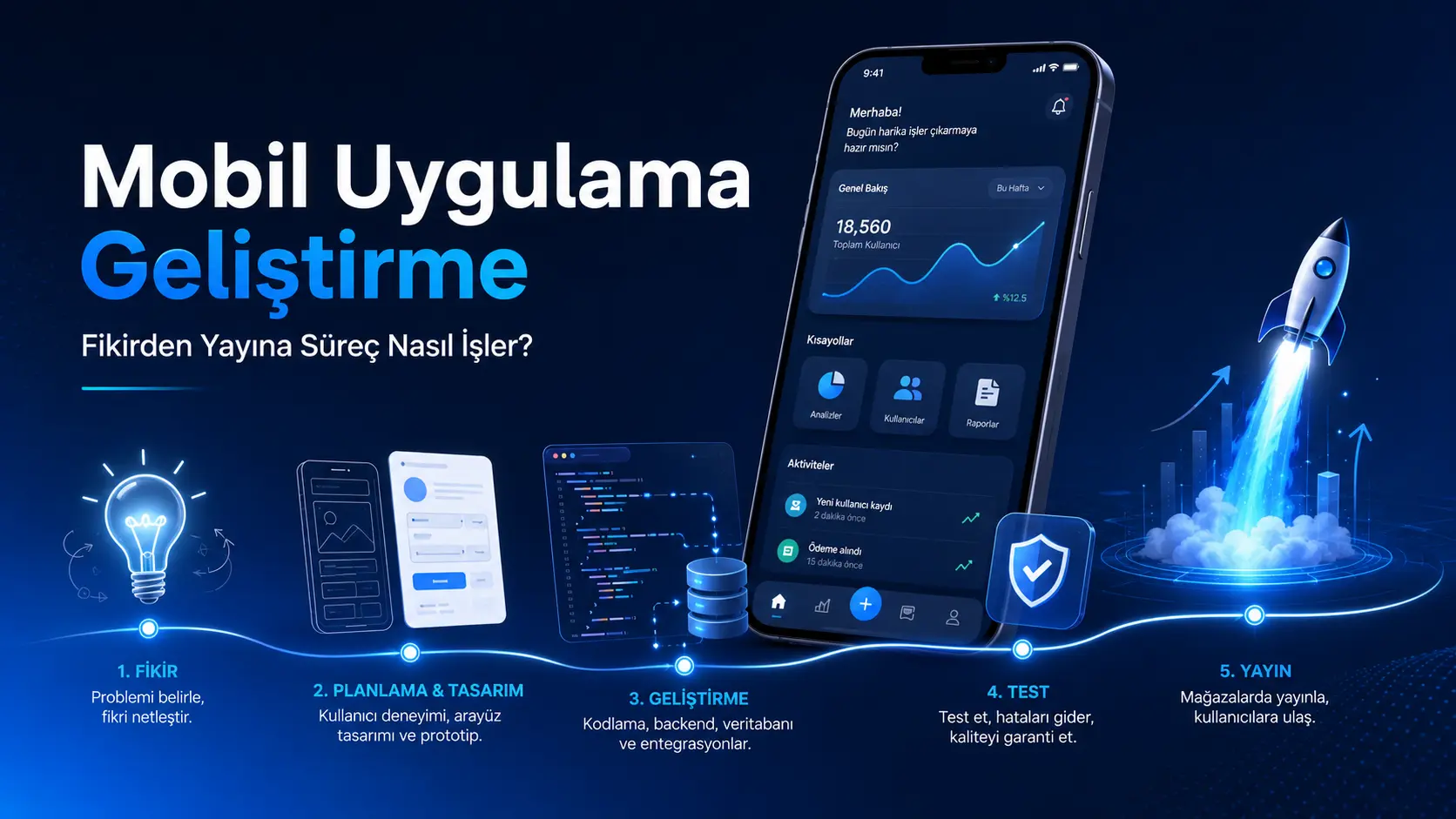
Your First Guide to Commissioning a Mobile App: From Idea to Launch
I Have an App Idea. Where Do I Start?
You may already have an idea for a mobile app.
Perhaps you want to take a service online, communicate with customers more easily or launch a new business.
The first question is usually:
“How does this idea become a real app?”
This is where mobile app development begins. A good app is more than attractive screens: it should make users' lives easier, run smoothly, keep data secure and remain maintainable.
Widespread mobile use in Türkiye reinforces this need. The 2026 figures cited here report 77.5 million internet users and 81.9 million mobile connections. Most mobile connections fall into the 3G, 4G or 5G broadband category, reflecting how accustomed people have become to handling everyday tasks on their phones.
Mobile apps are therefore relevant beyond large brands. Education, healthcare, ecommerce, appointments, service management, field operations, customer tracking, memberships and custom business processes can all create a need for an app.
What Is Mobile App Development?
Mobile app development covers the entire process of planning, designing, coding, testing, publishing and maintaining an application for Android and iOS devices.
The work includes planning how the application operates behind the scenes as well as designing its screens.
For example:
How will users register?
Where will data be stored?
Will there be an admin panel?
Should a notification be sent?
Will the app accept payments?
Will users message each other?
Will it use location, file uploads or the camera?
Will it be published on the App Store and Google Play?
The answers define the project's scope.
Mobile app development turns an idea into a working digital product that can be managed and maintained.
Who Can Benefit from a Mobile App?
Commissioning an app is not limited to technology startups.
An app may make sense for:
Businesses that want ongoing contact with customers
Teams needing appointments, orders, tracking or notifications
Education, coaching and consulting services moving online
Brands building ecommerce or membership services
Companies managing field teams, service workflows or operations
Entrepreneurs testing an idea with an MVP
Businesses that need a more personal experience than their website offers
The key point is this:
Not every idea needs an app. A well-designed website or web application can be a better starting point. Apps become more compelling when people regularly sign in, receive notifications, complete tasks or use personal accounts.
Website or Mobile App?
This is a common question.
They serve different needs and can complement each other.
Requirement | Website | Mobile app |
|---|---|---|
Visibility on Google | Very strong | Supporting role |
Quick business introduction | Well suited | More involved |
Accounts and regular use | Moderate | Very well suited |
Sending notifications | Limited | Powerful |
Camera, location and device features | Limited | Stronger |
Brand loyalty | Moderate | Stronger |
Initial investment | Usually lower | Usually higher |
A website may be enough if you only need to introduce your services.
An app may be more suitable when people regularly place orders, book appointments, follow content or return to use your service.
How Does the Development Process Work?
People commissioning an app often want to understand how the project will progress.
A well-planned process usually includes:
Idea analysis
Defining the scope
Mapping user journeys
Design
Choosing the technology
Mobile app development
Backend and admin panel development
Testing
App store publication
Maintenance and further development
Let's look at these steps.
1. Idea Analysis: What Problem Will the App Solve?
Every project starts with an idea, but coding should not be the first step.
First, answer these questions:
What problem does the app solve?
Why would someone download it?
Are similar apps available?
How do people handle this task today?
What is the app's core feature?
Which features are essential for the first release, and which can wait?
Imagine a customer with an idea.
“I want something like a food delivery app.” A closer discussion may reveal that the real need is an ordering system for one restaurant, with menu management and customer notifications.
These are different projects.
One is a marketplace; the other is a restaurant's own ordering app. Their costs, schedules, architecture and admin tools differ substantially.
The first step is to simplify and clarify the idea.
2. Scope: What Belongs in the First Release?
Scope is one of the most important decisions in app development.
Each additional feature increases development time, cost and testing requirements.
A useful approach for the first version is:
Launch a working core product, then improve it using feedback.
This first release is often called an MVP.
MVP means “minimum viable product”: the simplest useful version of your app.
For an appointment app, the first release might include:
User registration
Service selection
Appointment booking
Appointment management in the admin panel
Notifications
A basic profile screen
Advanced reports, campaigns, ratings, loyalty cards, live support and detailed analytics may be unnecessary at this stage.
A clear scope keeps the project under control.
3. User Journeys: How Will People Navigate the App?
A good app needs more than an attractive appearance.
Users should quickly understand what to do when they open it.
That is why user journeys are mapped before design begins.
For example:
The user opens the app.
They sign in or register.
The home screen shows relevant options.
They open the section they need.
They complete a form.
They receive confirmation.
A notification follows if needed.
Unclear journeys lead to repeated changes during development, increasing both time and cost.
Well-planned journeys make an app simpler and easier to use.
4. Design: It Must Be Usable as Well as Attractive
Mobile design is about more than looking modern.
The design should answer these questions:
Can people find what they need?
Are buttons understandable?
Is text readable?
Do screens work on smaller phones?
Do colours and icons guide users?
Is there unnecessary complexity?
Good design reduces effort.
Space is limited on phones. Information that fits comfortably on a website may need cards, tabs, bottom navigation or simple lists in an app.
User experience is especially important here.
People will avoid an app they find difficult, even if it works correctly.
5. Technology: Flutter, Backend, Database and Admin Panel
Technology choices shape the app's future.
Flutter is an option for many projects because it supports iOS and Android development from one codebase, an approach also highlighted in its official documentation.
This can help teams deliver a first release within a controlled budget.
However, an app involves more than the screens on a phone.
Many projects also need:
Backend
The backend is the part of an application that manages data behind the scenes.
Registration, sign-in, orders, messages, payments, notifications and admin functions commonly rely on the backend.
Database
The database stores the app's information.
For example:
User details
Orders
Appointments
Messages
Products
Files
Payment records
This information must be stored securely, consistently and in a way that supports growth.
Admin Panel
The admin panel is the control interface for the people running the app.
For example, an ordering app's admin panel can support:
Viewing orders
Editing products
Managing users
Sending notifications
Reviewing reports
People often focus on the customer experience when commissioning an app. Managing the service is equally important.
Without suitable admin tools, the workload grows as the app expands.
6. Development: Turning Designs into a Working App
Development begins once the design and scope are clear.
Screens are implemented, backend services connected and user interactions made functional.
For example:
Sign-in and registration
Home
Profile screen
Listing pages
Detail screens
Forms
Notifications
File uploads
Payment infrastructure
Admin panel integration
A clear, maintainable codebase matters at this stage.
The app will continue to evolve after launch. Adding features, fixing bugs and improving performance all depend on a well-organised foundation.
Working today is not enough; the app needs to remain maintainable.
7. Testing: Catching Problems Before Launch
Testing should not be skipped.
Even apparently minor bugs can seriously harm the user experience.
Testing should check:
Do sign-in and registration work correctly?
Do forms submit the right data?
What happens when connectivity is lost?
Do notifications reach the intended users?
Is data kept correctly separated?
Does the layout work across screen sizes?
Is the experience consistent on Android and iOS?
Do admin changes appear correctly in the app?
Testing is particularly important when personal data is involved.
Showing data to the wrong person, displaying incorrect payment information or sending misdirected notifications can damage trust.
Testing protects user trust as well as technical quality.
8. Publishing on the App Store and Google Play
A finished app is not the end of the project.
It must also be prepared for submission to the app stores.
Google Play sets technical requirements such as target API levels for new apps and updates. The policy cited in this article required Android 15 (API level 35) or higher from 31 August 2025; check the current requirements before submission.
Apple reviews submissions across areas including safety, performance, business practices, design and legal requirements.
Publication typically requires:
App name
App description
Category selection
Screenshots
App icon
Privacy policy
Terms of use
Test account details
Data collection and permission disclosures
Android and iOS builds
Include publication in the project plan.
The app must be presented in accordance with store requirements as well as implemented correctly.
How Long Does App Development Take?
The schedule depends on the scope.
The following are illustrative estimates:
Project type | Estimated duration |
|---|---|
Simple information or content app | 3–6 weeks |
App with sign-in, profiles, listings and an admin panel | 6–12 weeks |
App with appointments, payments, notifications or messaging | 10–20 weeks |
Marketplace, multi-role system or large custom application | 4 months or more |
These are not guaranteed delivery times.
Design complexity, screen count, user roles, backend services, payments, notifications, maps, messaging, uploads and store review all affect delivery.
Define the scope first, then create a realistic schedule.
What Determines the Cost?
There is no single price for mobile app development.
Two ideas can look similar but have very different technical requirements.
The main factors include:
Number of screens
Custom design versus an existing design structure
Android and iOS support
User roles
Admin panel
Backend development
Database structure
Payment system
Notifications
Maps and location features
Messaging
File or image uploads
User accounts
Reporting screens
Store publication
Maintenance and updates
A content-only app costs differently from one that handles payments, appointments and notifications through an admin panel.
The useful answer to “How much does an app cost?” is:
Define the requirements and scope before estimating the cost.
What Should You Consider Before Commissioning an App?
Price should not be your only consideration.
Other important factors include:
1. Clear Scope
Specify which features belong in the first release.
Leaving decisions until later can create confusion.
2. User-Focused Design
An attractive app that is difficult to use is unlikely to succeed.
People should understand what to do when they open it.
3. A Reliable Backend
Store data correctly, show it only to the appropriate users and design for growth.
4. Suitable Admin Tools
The app needs to be manageable.
Products, orders, appointments, users, content, notifications and reports should be easy to control.
5. Security
Handle personal data, sessions, payments and files securely.
6. A Maintenance Plan
After launch, operating system changes, store policies, bug fixes and new features require ongoing work.
An app cannot simply be built once and left untouched forever.
Does the Work End at Launch?
No.
Launch marks the start of a new phase.
Real feedback arrives when people start using the app.
For example:
Some screens may be confusing.
Unexpected bugs may appear.
Users may request new features.
Performance may need improvement.
Store requirements may change.
Android or iOS updates may require compatibility work.
Development should therefore include a maintenance and improvement plan.
A good app becomes more useful over time.
I Have an App Idea. What Is My First Step?
Your first step should not be to start coding immediately.
Begin by clarifying the idea.
Ask yourself:
Who is this app for?
What problem will it solve for them?
Which features are essential in the first release?
Is an admin panel needed?
Will users log in?
Will it include payments, notifications, messaging or location?
Is Android enough, or is iOS also required?
Who will manage it after launch?
These answers form the project roadmap.
Without a clear roadmap, projects often take longer, cost more and fail to meet expectations.
How Can I Help?
Careful planning is the most important starting point when commissioning an app.
My approach is to establish the right structure for your idea before turning it into code.
Depending on your needs, I can help with:
App idea analysis
User journey planning
Modern, straightforward interface design
Android and iOS development with Flutter
Backend services with Supabase or Firebase
Admin panel development
Notifications, payments, uploads and user management
App Store and Google Play publication
Post-launch maintenance and development
The goal goes beyond making an app that runs.
It is to create a clear, manageable, secure and responsive product that can evolve over time.
Conclusion: Good Apps Start with Good Planning
Mobile app development involves many stages between the initial idea and launch.
Success starts with a clear idea, an understanding of users, a realistic scope, straightforward design and a reliable technical foundation.
Before commissioning development, assess the idea, audience, features, cost and post-launch responsibilities together.
A well-planned app can keep evolving, provide value to users and strengthen your business online.
Frequently Asked Questions About Mobile App Development
How long does development take?
It depends on the scope. Simple apps may take a few weeks; projects with admin tools, payments, notifications, messaging and a custom backend can take several months.
What affects the cost?
Screen count, design complexity, platform support, backend requirements, admin tools, payments, notifications, user roles and maintenance all contribute.
Can Android and iOS apps be developed together?
Yes. Technologies such as Flutter support both platforms from one codebase, which can simplify delivery and maintenance for many projects.
Does an app need an admin panel?
Usually, if it involves managing users, orders, appointments, content, payments, notifications or reports. Admin tools make the service manageable.
Is maintenance needed after launch?
Yes. Bug fixes, performance improvements, store requirements, operating system updates and new features all require maintenance.
What should I prepare before commissioning an app?
Describe your idea, target audience, essential features, examples of similar apps and management requirements.
Does every business need an app?
No. A website may be enough. An app may be more suitable when users regularly sign in, receive notifications, perform tasks or use personal accounts.
Comments (0)
No comments yet. Be the first!
Leave a comment