Mehmet Karataş LogoMehmet Karataş
HomeServicesProjectsBlogAboutFunToolsCourses (TR)
Contact
Mehmet Karataş LogoMehmet Karataş

Contact

I build solutions with modern web and mobile technologies.

Contact
benmuhendisiniz@gmail.com

Diyarbakır, Türkiye — Remote services across Türkiye and abroad

Quick links

  • Home
  • Services
  • Projects
  • Blog
  • About
  • Contact
  • Fun
  • Tools
  • Courses (TR)
  • CV / Résumé (TR)

Services

  • Web Development
  • Mobile App Development
  • Custom Software Development
  • E-Commerce Websites
  • SEO and Online Visibility
  • Software and Project Consulting

© 2026 Mehmet Karataş. All rights reserved.

Privacy noticeCookie policy
HomeProjectsBlogServicesAboutFunToolsCourses (TR)
HomeBlogTech NewsA Beginner’s Guide to Web Development: HTML, CSS, JavaScript, React, Django or ASP.NET?
All articles
Tech News
30 December 2025
62
5 min read

A Beginner’s Guide to Web Development: HTML, CSS, JavaScript, React, Django or ASP.NET?

Starting web development from scratch? This comprehensive guide explains the differences between HTML, CSS, JavaScript, React, Next.js, Django and ASP.NET in clear language. Discover which technology to start with, step by step.

Mehmet Karataş

Mehmet Karataş

Author

Back to blog Work with me
A Beginner’s Guide to Web Development: HTML, CSS, JavaScript, React, Django or ASP.NET?

A Practical Guide for Web Development Beginners

“Should I learn HTML or JavaScript? What is React? What does Next.js do? Django or ASP.NET?”

Let’s be honest.
Everyone new to the web gets stuck at the same point:

“Everywhere I look, people say something different…
Where should I start?
I don’t want to waste time learning the wrong thing.”

I’m writing this article to clear up that confusion.
Take a breath, grab a tea and let’s begin.


First, See the Big Picture — the Most Important Part

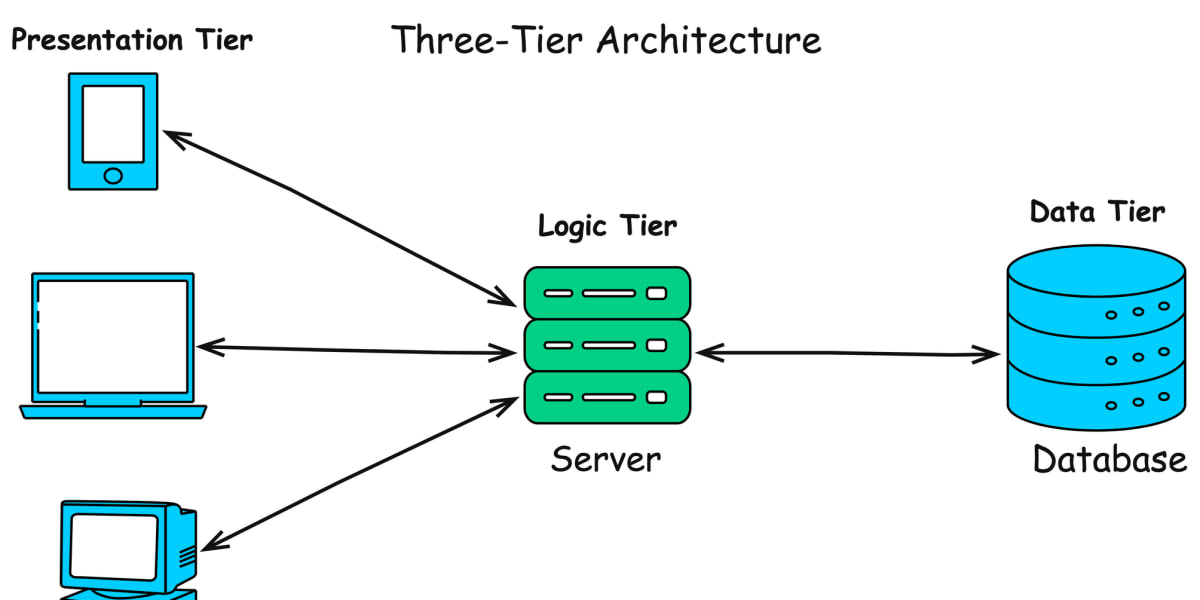
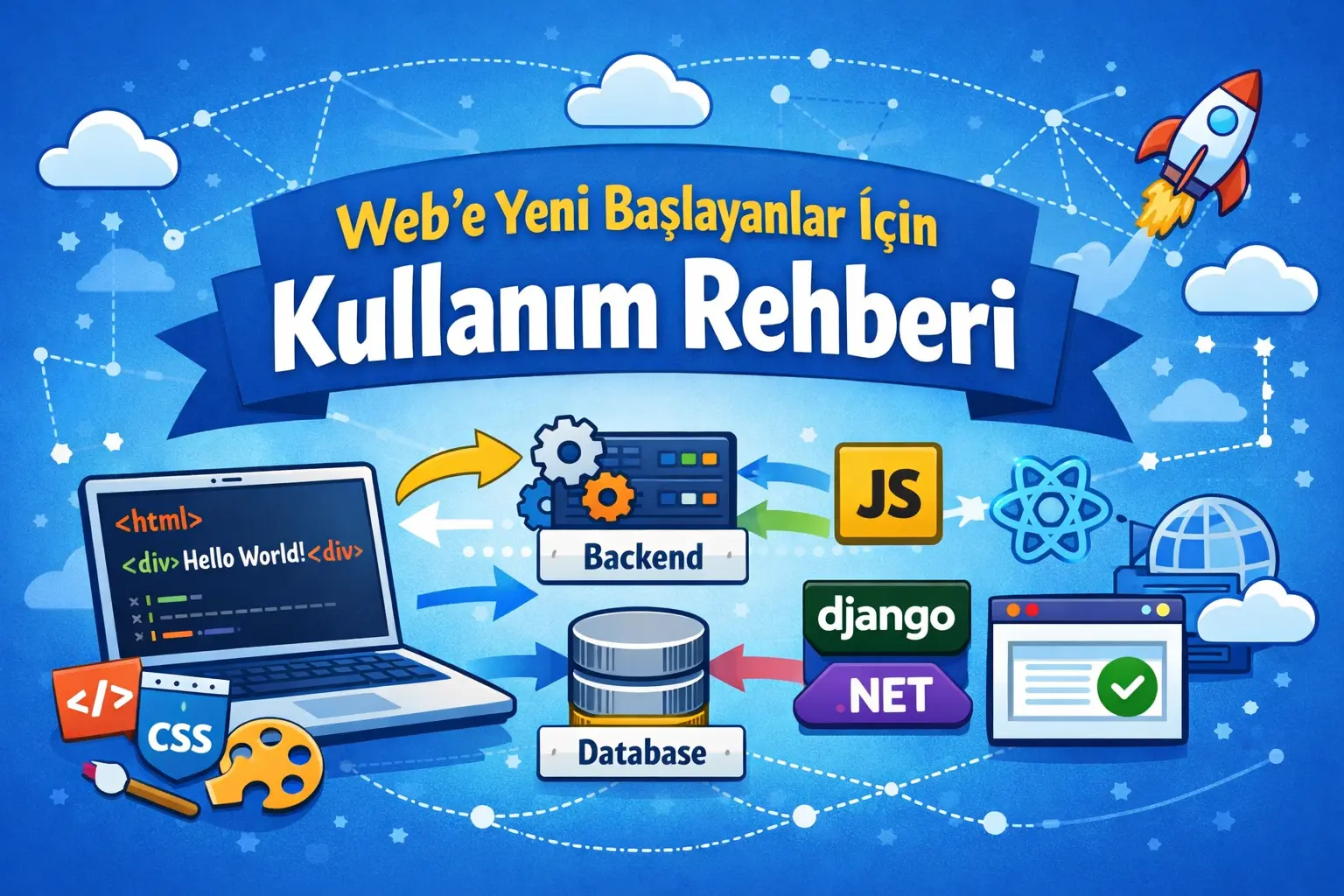
A website or web application has three main parts:

Image

Image
  1. The Visible Part: Frontend
    The screens, buttons and text users see

  2. Behind the Scenes: Backend
    Sign-ins, rules and calculations

  3. Data: Database
    Users, articles, products and records

Throughout this article, I’ll connect everything to these three parts.
We’ll look at the pieces as a whole.


1️⃣ Getting Started with Frontend: HTML, CSS and JavaScript

What Is HTML, in Simple Terms?

HTML is a page’s skeleton.
It defines the headings, paragraphs, buttons and other structural elements.

Think of a house:
HTML = pillars and walls

What Is CSS?

CSS defines the website’s appearance.
Colours, fonts, layout and mobile responsiveness.

Think of a house:
CSS = paint, sofas and curtains

What Is JavaScript?

JavaScript brings a website to life.

  • Make something happen when a button is clicked

  • Submit a form

  • Fetch data

Think of a house:
JavaScript = electricity, the doorbell and air conditioning

Image

Image

Image

⚠️ A Simple Truth:
Tools such as React, Next.js and Vue are built on JavaScript.
If these three foundations are weak, advanced tools will be much harder to use.


2️⃣ “I’ve Learned HTML, CSS and JavaScript. What Next?”

This is where frameworks enter the picture.

What Is React?

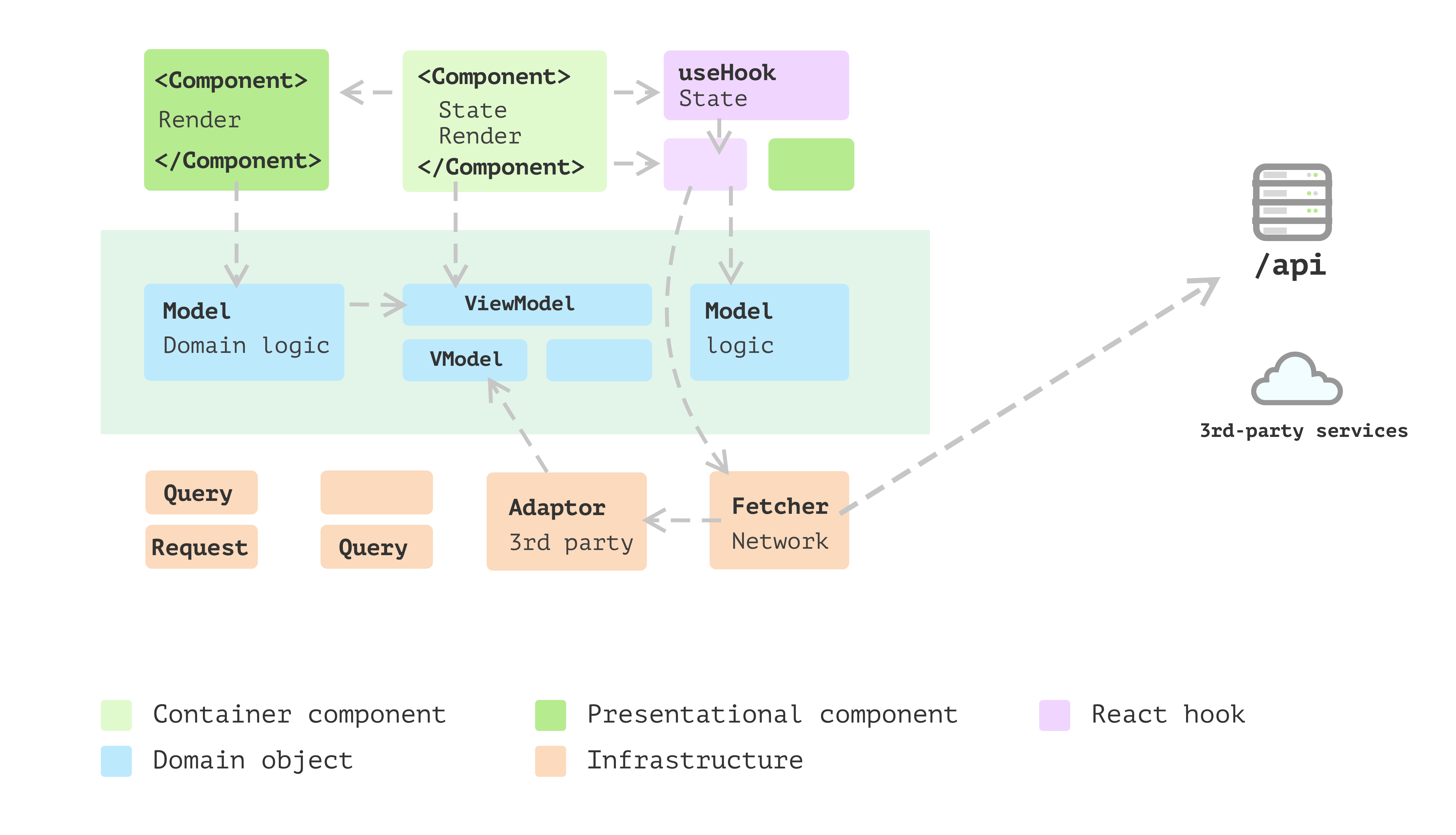
React lets you build screens from separate components.

  • A separate header

  • A separate card

  • A separate button

This helps keep:

  • Code readable

  • Growing projects organised

Why Does Everyone Talk About React?

Because:

  • There are many job opportunities

  • The ecosystem is large

  • Many developers learn it

Image

Image

Image

But remember:
React handles the interface.
It is not a complete web application on its own.


3️⃣ What Is Next.js? Isn’t React Enough?

React is useful, but some projects need more.

Next.js adds the following on top of React:

  • Page routing

  • Search engine support (SEO)

  • Fast loading

  • Backend capabilities when needed

React = a car
Next.js = a car + navigation + safety features + servicing

When to Use React?

  • An admin panel

  • A dashboard

  • An internal system

When to Use Next.js?

  • A blog

  • A promotional website

  • Projects that need to appear in search results

For a beginner, a sensible progression is:

React first → Next.js afterwards


4️⃣ “I Understand the Frontend. What About the Backend?”

This is where backend development begins.

What Does the Backend Do?

  • User sign-in

  • Authorisation

  • Saving data

  • Applying rules

The frontend requests, and the backend decides.


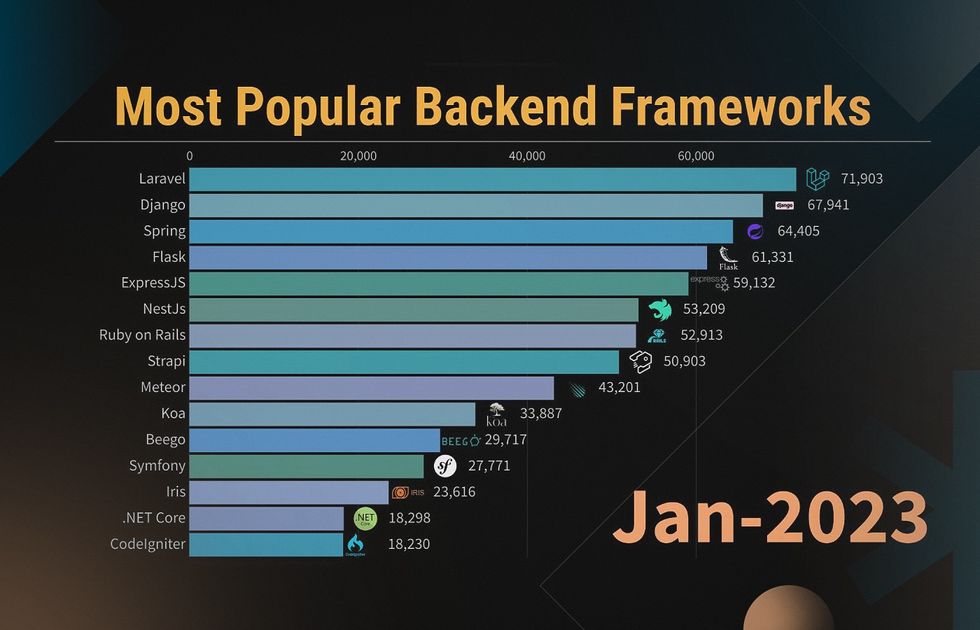
5️⃣ Django or ASP.NET? A Common Point of Confusion

Let’s keep it simple.

Django (Python)

Advantages

  • Quick results

  • A built-in admin panel

  • Beginner-friendly

Disadvantages

  • Large projects can become complex without careful organisation

ASP.NET Core (C#)

Advantages

  • A robust architecture

  • Widely used in enterprise development

  • Strong foundations for long-term projects

Disadvantages

  • A somewhat steeper starting point

Image

Image

Image

🧭 Which Should You Choose?

  • “I want to learn quickly and build a project” → Django

  • “I want a strong foundation for the long term” → ASP.NET

Neither choice is inherently wrong. The mistake is choosing without knowing your goal.


6️⃣ Databases — Nothing to Fear

A database is where information is stored.

My recommendation for a beginner:

  • PostgreSQL

Why?

  • Powerful

  • Widely adopted

  • Used in many environments

Alternatives:

  • SQLite → small projects

  • MySQL → common, with some limitations

  • MongoDB → flexible, but potentially tricky for beginners


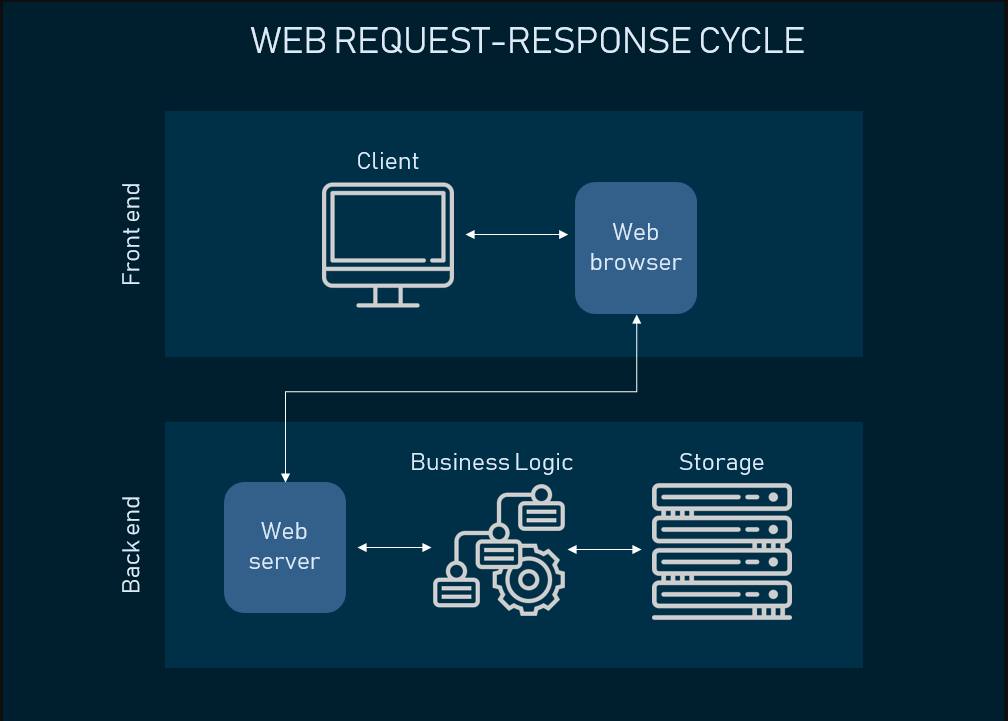
7️⃣ How Do the Frontend, Backend and Database Communicate?

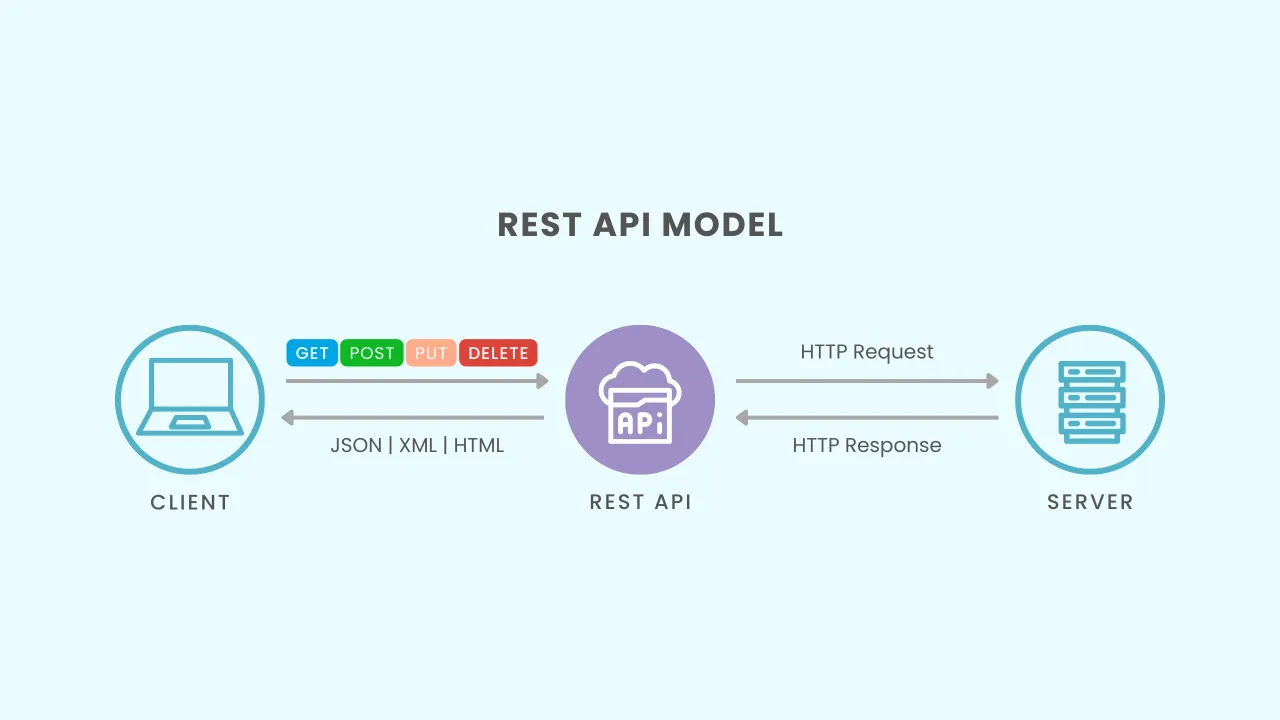
The flow looks like this:
Image

Image

Image
  1. The user presses a button

  2. The frontend sends a request to the backend

  3. The backend checks the database

  4. A response comes back

  5. The screen updates

One way to organise this communication is a REST API.
There is nothing mysterious about it: it is a structured way for systems to communicate.


8️⃣ Domains and Deployment — Keep It Simple

For a beginner, an easy route is:

  • Frontend:

    • Next.js → Vercel

    • React → Netlify

  • Backend:

    • Render

  • Database:

    • Supabase

Buy a domain → connect it → you’re ready.
Deployment is no longer as difficult as it used to be.


9️⃣ “What Should I Do Now?” A Clear Roadmap

Here is a straightforward plan:

🔹 Month 1

  • HTML

  • CSS

  • JavaScript

  • Build a simple website

🔹 Month 2

  • React

  • Understand components

  • Build a small app

🔹 Month 3

  • Next.js

  • Choose a backend: Django or ASP.NET

  • Connect a database

  • Publish the website

🎯 The Goal:
By the end of three months, have a working project online.


Final Thoughts

Web development itself is not the main obstacle.
What makes it harder is:

  • Everyone giving different advice

  • Unnecessary complexity

  • The pressure to learn one more thing

Remember:

One project finished,
is worth more than ten topics half learned.

If someone reading this guide thinks:

  • “I know what to do now”

  • “It no longer feels overwhelming”

then it has achieved its purpose.

Comments (0)

No comments yet. Be the first!

Leave a comment

Write a comment
Mehmet Karataş

Mehmet Karataş

Computer Engineer

About me
Related articles
  • What Are Frontend and Backend? Their Differences and Roles in a Software Project

    What are frontend and backend, how do they differ and what do they do in a software project? This guide explains the visible and hidden parts of software, from user screens to servers that store data. If you are planning a website, mobile app, dashboard or custom application, learn how interfaces, APIs, databases, accounts, payments and security affect development. We also explore what determines frontend and backend costs, when both are needed and what to define before starting.

  • What Is Node.js? Its Role in Backend Development

    Node.js is an open-source runtime that runs JavaScript outside the browser, including on servers. It can power APIs for websites, mobile apps, dashboards and real-time systems. This guide explains its execution model, event loop, database connections, authentication, messaging and API development, along with suitable use cases, limitations and planning considerations.

  • What Is Next.js? Why It Matters for Modern, SEO-Friendly Websites

    Next.js is a comprehensive React framework for building fast, modern, secure and SEO-friendly websites. Server rendering and pre-rendering can make content easier for search engines to access. It provides organised ways to manage titles, descriptions, social images, sitemaps, robots.txt, structured data and image optimisation. Using Next.js alone does not guarantee high search rankings. Good results also require useful content, appropriate keywords, mobile usability, security, performance and a strong user experience.

Explore projects